> ## Documentation Index
> Fetch the complete documentation index at: https://docs.strata.io/llms.txt
> Use this file to discover all available pages before exploring further.
# LDAP Provider
The LDAP Provider mode configures the Maverics Orchestrator as a virtual LDAP directory. It presents a standard LDAP interface to applications while sourcing identity data from modern cloud identity providers -- enabling LDAP-dependent applications to authenticate against Microsoft Entra ID, Okta, or other cloud IdPs without any application changes.
**When to use this mode**
* **LDAP Provider** -- Choose this mode for applications that require an LDAP directory for authentication or directory lookups. Often paired with HTTP Proxy mode for comprehensive legacy app identity.
* **HTTP Proxy** -- Choose this mode when you need to protect applications via reverse proxy. Frequently combined with LDAP Provider for legacy stacks.
* **OIDC Provider** -- Choose this mode when the application supports OpenID Connect natively.
* **SAML Provider** -- Choose this mode when the application supports SAML 2.0 natively.
* **AI Identity Gateway** -- Choose this mode for securing AI agent-to-tool communication via MCP.
## Prerequisites
**Service Extensions are required.** Every LDAP Provider integration requires Go-based Service Extensions to handle LDAP operations (bind authentication, search queries, credential lookups). The LDAP Provider cannot function without them -- there is no declarative-only configuration path. Plan for Service Extension development as part of your integration.
Before configuring the LDAP Provider, ensure you have:
1. **Service Extension development capability** -- You need to write Go-based Service Extensions that implement the LDAP operation handlers: `authenticateSE` for bind operations, `searchSE` for search queries, and optionally `getHashedCredentialsSE` for NTLM. See [Service Extensions reference](/reference/orchestrator/service-extensions).
2. **Downstream application LDAP requirements** -- You must know what your LDAP-dependent application expects: which LDAP operations it performs (bind, search, compare), what base DNs it queries, which attributes it expects in search results (e.g., `cn`, `sAMAccountName`, `memberOf`), and what bind method it uses (simple bind or SASL/NTLM).
3. **Attribute source systems** -- You must have identity attribute data available in systems the Orchestrator can query during LDAP operations. These sources -- cloud IdPs (Microsoft Entra ID, Okta), databases, APIs, directories -- provide the data that the Service Extensions translate into LDAP responses.
4. **A running Maverics Orchestrator** -- Follow the [Quick Start guide](/guides/getting-started/quick-start) or [installation reference](/reference/orchestrator/installation) if not yet installed.
## Use Cases
* **Virtualizing cloud IdP as LDAP directory** -- Present Microsoft Entra ID, Okta, or PingFederate as an LDAP directory for applications that only know how to authenticate via LDAP bind operations.
* **LDAP-dependent legacy app migration** -- Migrate legacy applications off on-premises Active Directory to cloud identity providers without changing the application's LDAP configuration.
* **Combining with HTTP Proxy for full legacy stack** -- Pair LDAP Provider with HTTP Proxy mode to modernize applications that depend on both LDAP lookups and header-based authentication.
* **Directory consolidation** -- Present multiple identity sources as a single unified LDAP directory, consolidating user lookups across disparate systems.
## How It Works
The LDAP Provider operation flow follows these steps:
1. **LDAP client connects** -- An LDAP-dependent application (the LDAP client) connects to the Orchestrator's LDAP endpoint via `ldap://` or `ldaps://` (TLS-encrypted).
2. **Bind authentication** -- The client sends an LDAP bind request (simple bind with DN+password, or SASL/NTLM). The Orchestrator's Service Extension handles credential validation -- typically by translating the bind into an authentication request against a cloud identity provider.
3. **Root DSE discovery** -- The client reads the Root DSE entry to discover the directory's capabilities, naming contexts, and supported features. The Orchestrator serves configured Root DSE attributes.
4. **Search operations** -- The client sends LDAP search requests (base DN, scope, filter, attributes). The Orchestrator's search Service Extension translates these into queries against upstream identity sources and returns matching entries in LDAP format.
5. **Attribute translation** -- The Service Extension maps cloud IdP attributes (e.g., Microsoft Entra ID user properties) into the LDAP attribute names and formats the client application expects (e.g., `cn`, `sAMAccountName`, `memberOf`).
6. **Connection lifecycle** -- The Orchestrator manages connection timeouts (read/write deadlines) and handles multiple concurrent LDAP connections, each with its own bind state.
## Key Concepts
### Virtual Directory
The LDAP Provider is not a traditional LDAP server with its own data store. It is a virtual directory that translates LDAP protocol operations into queries against modern identity sources. The directory data comes from cloud IdPs, the LDAP protocol is just the interface.
### Service Extension-Driven
Unlike other Orchestrator modes that use declarative configuration for most operations, the LDAP Provider relies heavily on Service Extensions (Go code) for its core operations. The `authenticateSE` handles bind operations, the `searchSE` handles search queries, and the `getHashedCredentialsSE` handles NTLM credential lookups. This provides maximum flexibility for translating between LDAP semantics and cloud IdP APIs.
### Authentication Methods
Two authentication methods are supported: simple bind (DN+password, the most common) and SASL with NTLM via GSS-SPNEGO (for Windows-integrated applications). Both methods require Service Extensions to implement the actual credential validation against upstream providers.
### Pairing with HTTP Proxy
The LDAP Provider is most commonly deployed alongside HTTP Proxy mode in a **facade** (or "sandwich") pattern. The application sits between two Orchestrator roles: the HTTP Proxy handles browser-facing authentication while the LDAP Provider handles the application's backend LDAP operations.
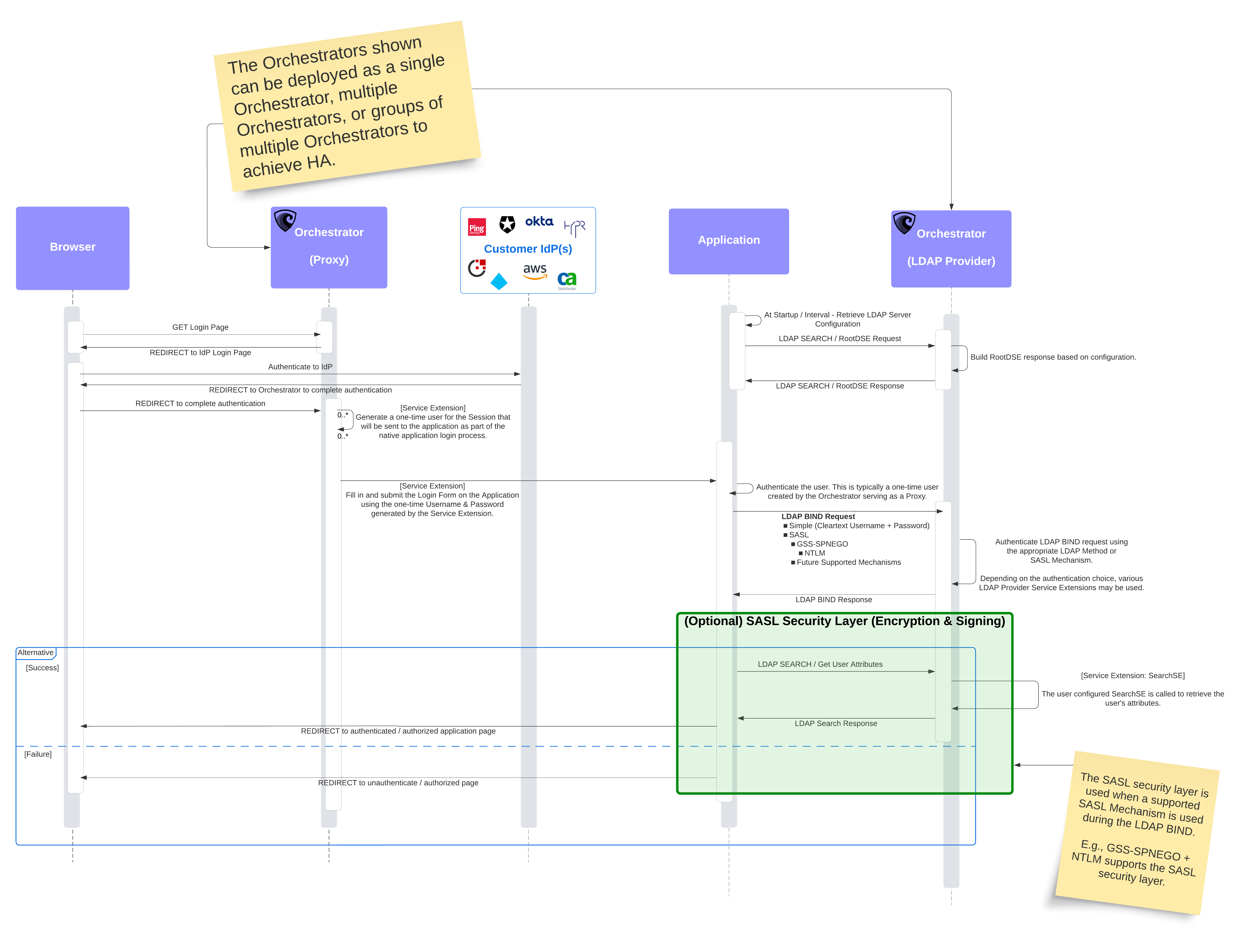 **Facade flow:**
1. A user requests a protected page. The Orchestrator (HTTP Proxy) intercepts and redirects the browser to a cloud IdP (Okta, Microsoft Entra ID, Google, AWS, etc.) for authentication with modern MFA and policies.
2. After successful authentication, the Orchestrator creates one-time credentials and delivers them to the downstream application using one of three methods:
* **Header injection** -- The Orchestrator injects identity headers (e.g., `SM_USER`, `X-Remote-User`) into the proxied request. The application reads these headers directly.
* **Form-stuffing ([upstream login](/reference/modes/http-proxy#upstream-login))** -- The Orchestrator's `loginSE` Service Extension POSTs one-time credentials to the application's native login form, automating the "double login" problem. The `isLoggedInSE` checks whether the app session is already established.
* **Session/cookie** -- The Orchestrator stores credentials in the session, making them available to subsequent LDAP bind operations.
3. The application sends an LDAP Bind request to the Orchestrator (LDAP Provider) to validate those credentials.
4. The application sends LDAP Search requests to retrieve user attributes (e.g., `cn`, `memberOf`, `sAMAccountName`).
5. The Orchestrator translates the LDAP queries into lookups against the cloud IdP and returns the results in LDAP format. The user sees the requested page.
The diagram shows two Orchestrator roles, but these can be deployed as a single Orchestrator running both HTTP Proxy and LDAP Provider modes, two separate Orchestrator instances, or groups of Orchestrators for high-availability (HA) deployments.
**Shared cache required for dual-Orchestrator facade deployments.** When the HTTP Proxy and LDAP Provider run as **separate Orchestrator instances** (the most common facade deployment), they need a **[shared cache](/reference/orchestrator/caches)** so that one-time credentials generated by the proxy Orchestrator can be validated by the LDAP Provider Orchestrator. Without a shared cache, the LDAP Provider instance has no way to look up the credentials the proxy instance created.
When both modes run on a **single Orchestrator instance**, the local in-memory cache is sufficient because credential data stays in the same process.
See the [Caches reference](/reference/orchestrator/caches) for cache setup and the [Scale for Production guide](/guides/operations/scale) for multi-instance deployment guidance.
### No Apps Array
Unlike OIDC, SAML, and HTTP Proxy modes, the LDAP Provider does not use separate app entries. All settings are at the provider level -- there is one virtual directory per Orchestrator instance.
## Setup
In the Maverics Console, LDAP Provider settings are configured in the **Deployment Settings** dialog under the LDAP Provider section.
**Server Settings**
| Field | Required | Description |
| --------------- | -------- | -------------------------------------------------------------------------------------------- |
| Enable | Yes | Toggle to enable the LDAP Provider. The provider must be enabled for it to start. |
| Protocol | Yes | Dropdown to select the LDAP protocol: `ldap://` (unencrypted) or `ldaps://` (TLS-encrypted). |
| URI | Yes | LDAP listen address. Default port is 389 for `ldap://` or 636 for `ldaps://`. |
| TLS Certificate | No | File path to the TLS certificate (used when protocol is `ldaps://`). |
| TLS Key File | No | File path to the TLS private key (used when protocol is `ldaps://`). |
**Search**
| Field | Required | Description |
| ------------------------ | -------- | --------------------------------------------------------------------------- |
| Search Service Extension | No | Dropdown to select a Service Extension for handling LDAP search operations. |
**Authentication**
| Field | Required | Description |
| -------------------------------- | -------- | ------------------------------------------------------------------------------------------------------------ |
| Allow Anonymous | No | Toggle to allow anonymous LDAP bind operations. Off by default. |
| Enable Simple Auth | No | Toggle to enable simple bind authentication (DN + password). |
| Authentication Service Extension | No | Dropdown to select a Service Extension for simple bind authentication. Required when simple auth is enabled. |
The Console UI provides a subset of the full YAML configuration. Advanced settings such as SASL/NTLM authentication, Root DSE attributes, and read/write deadline timeouts are only available in YAML. See the [Configuration tab](#setup) for the complete reference.
This example shows an LDAP Provider configuration with LDAPS, simple bind authentication via a service extension, and search handling.
```yaml maverics.yaml theme={null}
tls:
ldap-server-tls:
certFile: /etc/maverics/certs/ldap-server.pem
keyFile: /etc/maverics/certs/ldap-server-key.pem
connectors:
- name: upstream-idp
type: oidc
oidcWellKnownURL: https://idp.example.com/.well-known/openid-configuration
oauthClientID: ldap-bridge
oauthClientSecret:
ldapProvider:
enabled: true
uri: ldaps://0.0.0.0:636
tls: ldap-server-tls
readDeadline: 5m
writeDeadline: 5m
rootDSE:
attributes:
namingContexts:
- dc=example,dc=com
authentication:
allowAnonymous: false
methods:
simple:
enabled: true
authenticateSE:
file: /etc/maverics/extensions/authenticate.go
funcName: Authenticate
search:
searchSE:
file: /etc/maverics/extensions/search.go
funcName: Search
```
#### Configuration Reference
The `ldapProvider` top-level key configures the virtual LDAP directory server. Unlike other modes, LDAP Provider does not use app entries -- all configuration is at the provider level.
| Key | Type | Default | Required | Description |
| ------------------------------------------------------------------------------------------- | ------- | ------- | ----------- | ------------------------------------------------------------------------------------------ |
| `ldapProvider.enabled` | boolean | `false` | Yes | Enable the LDAP Provider |
| `ldapProvider.uri` | string | -- | Yes | LDAP listen URI -- `ldap://` for plain or `ldaps://` for TLS (e.g., `ldaps://0.0.0.0:636`) |
| `ldapProvider.tls` | string | -- | Conditional | Named TLS profile -- required when URI scheme is `ldaps://` |
| `ldapProvider.readDeadline` | string | -- | No | Read I/O timeout (duration string, e.g., `5m`, `30s`) |
| `ldapProvider.writeDeadline` | string | -- | No | Write I/O timeout (duration string, e.g., `5m`, `30s`) |
| `ldapProvider.rootDSE.attributes` | object | -- | No | Custom Root DSE attributes exposed to LDAP clients (e.g., `namingContexts`) |
| `ldapProvider.search.searchSE` | object | -- | No | Service Extension for handling LDAP search operations |
| `ldapProvider.authentication.allowAnonymous` | boolean | `false` | No | Allow anonymous LDAP bind operations |
| `ldapProvider.authentication.methods.simple.enabled` | boolean | `false` | No | Enable simple bind authentication |
| `ldapProvider.authentication.methods.simple.authenticateSE` | object | -- | Conditional | Service Extension for simple bind authentication -- required when simple auth is enabled |
| `ldapProvider.authentication.methods.sasl.enabled` | boolean | `false` | No | Enable SASL authentication mechanisms |
| `ldapProvider.authentication.methods.sasl.mechanisms.gssspnego.enabled` | boolean | `false` | No | Enable GSS-SPNEGO mechanism for Windows authentication |
| `ldapProvider.authentication.methods.sasl.mechanisms.gssspnego.ntlm.enabled` | boolean | `false` | No | Enable NTLM authentication under GSS-SPNEGO |
| `ldapProvider.authentication.methods.sasl.mechanisms.gssspnego.ntlm.netbiosDomainName` | string | -- | Conditional | NetBIOS domain name for NTLM (required when NTLM enabled) |
| `ldapProvider.authentication.methods.sasl.mechanisms.gssspnego.ntlm.netbiosMachineName` | string | -- | Conditional | NetBIOS machine name for NTLM |
| `ldapProvider.authentication.methods.sasl.mechanisms.gssspnego.ntlm.getHashedCredentialsSE` | object | -- | Conditional | Service Extension for NTLM credential lookup -- required when NTLM is enabled |
## Root DSE
The Root DSE (DSA-Specific Entry) is the entry an LDAP client reads when connecting to discover directory capabilities. Custom attributes allow the virtual directory to present itself with the expected naming contexts and supported features.
Root DSE attributes are configured via YAML only. The Console UI manages the core LDAP Provider settings (enable, protocol, URI, TLS, search SE, authentication) in the Deployment Settings dialog. See the Configuration tab for Root DSE attribute configuration.
```yaml theme={null}
ldapProvider:
rootDSE:
attributes:
namingContexts:
- dc=example,dc=com
```
## Authentication Methods
The LDAP Provider supports two authentication methods: simple bind and SASL.
### Simple Bind
Simple bind authentication uses a DN and password to authenticate. The `authenticateSE` Service Extension handles the actual credential validation -- typically by bridging the LDAP bind to an OIDC Resource Owner Password Credentials (ROPC) grant against an upstream identity provider.
Simple bind authentication Service Extension paths are configured via YAML only. In the Console, you enable simple auth and select the Service Extension from the dropdown in Deployment Settings. The YAML format shown here provides the same configuration with explicit file path and function name.
```yaml theme={null}
ldapProvider:
authentication:
allowAnonymous: false
methods:
simple:
enabled: true
authenticateSE:
file: /etc/maverics/extensions/authenticate.go
funcName: Authenticate
```
The `authenticateSE` receives the bind DN and password, and returns a boolean indicating success or failure. This is the most common pattern for bridging LDAP authentication to modern identity providers.
**Illustrative example only.** The following Service Extension uses hardcoded credentials for testing. A production implementation would validate credentials against your upstream identity provider. See the [Service Extensions reference](/reference/orchestrator/service-extensions) for production patterns.
```go simple.go theme={null}
import (
"strings"
"github.com/strata-io/service-extension/orchestrator"
)
// This is an example Simple Authentication Service Extension that shows a quick way
// to test a Bind request using the Simple Authentication method between the
// application and the Orchestrator. In this example, only a user with the username
// of `bob` and the password of `th3Bu!ld3R` to be authenticated.
//
// A production version of this Service Extension would typically retrieve the
// password hash of the user from either `api.Cache` or `api.Session` and would
// compute the hash of the password received and compare it with the one stored. The
// user is typically a short-lived / one-time user created by an Orchestrator serving
// as the identity-aware proxy, after the end-user has been authenticated by
// the configured IdP.
func Authenticate(api orchestrator.Orchestrator, username string, password string) (bool, error) {
api.Logger().Debug(
"service", "LDAP Provider",
"extension", "Authenticate",
"msg", "authenticating user",
"username", username,
)
if strings.EqualFold(username, "bob") && password == "th3Bu!ld3R" {
api.Logger().Debug(
"service", "LDAP Provider",
"extension", "Authenticate",
"msg", "user authenticated",
"username", username,
)
return true, nil
}
api.Logger().Debug(
"service", "LDAP Provider",
"extension", "Authenticate",
"msg", "user not authenticated",
"username", username,
)
return false, nil
}
```
### SASL / NTLM
SASL authentication supports the GSS-SPNEGO mechanism with NTLM. This enables Windows domain credential authentication, allowing Windows-integrated applications to authenticate against the virtual directory using native Windows credentials.
| Key | Type | Description |
| --------------------------------------- | ------- | ------------------------------------------------------------ |
| `ntlm.enabled` | boolean | Enable NTLM authentication |
| `ntlm.disableRequiring128bitEncryption` | boolean | Disable the requirement for 128-bit encryption |
| `ntlm.netbiosDomainName` | string | NetBIOS domain name (e.g., `EXAMPLE`) |
| `ntlm.netbiosMachineName` | string | NetBIOS machine name (e.g., `LDAPSERVER`) |
| `ntlm.dnsDomainName` | string | DNS domain name (e.g., `example.com`) |
| `ntlm.dnsForestName` | string | DNS forest name (e.g., `example.com`) |
| `ntlm.dnsMachineName` | string | DNS machine name (e.g., `ldap.example.com`) |
| `ntlm.getHashedCredentialsSE` | object | Service Extension for NTLM credential hash lookup (required) |
SASL and NTLM authentication are configured via YAML only. These advanced authentication methods are not available in the Console UI.
```yaml theme={null}
ldapProvider:
authentication:
methods:
sasl:
enabled: true
mechanisms:
gssspnego:
enabled: true
ntlm:
enabled: true
netbiosDomainName: EXAMPLE
netbiosMachineName: LDAPSERVER
dnsDomainName: example.com
dnsForestName: example.com
dnsMachineName: ldap.example.com
getHashedCredentialsSE:
file: /etc/maverics/extensions/ntlm-creds.go
funcName: GetHashedCredentials
```
**Illustrative example only.** The following Service Extension uses a hardcoded test user map. A production implementation would retrieve NT and LM hashes from `api.Cache()` or `api.Session()`, computed by the Orchestrator proxy after the user authenticates with the cloud IdP. See the [Service Extensions reference](/reference/orchestrator/service-extensions) for production patterns.
```go gss_spnego_ntlm.go theme={null}
import (
"fmt"
"github.com/strata-io/go-ntlm"
"github.com/strata-io/service-extension/orchestrator"
)
var (
// THIS IS FOR TESTING PURPOSES ONLY. Do not use this pattern in a production
// deployment.
testUsers = map[string][]byte{
fmt.Sprintf("%s:%s", ntlm.ToUnicode("acme"), ntlm.ToUnicode("user123")): ntlm.ToUnicode("abc123"),
}
)
// This is an example of an NTLM NTLMGetHashedCredentials Service Extension and shows
// a simple way to test users while verifying the LDAP connection between the
// application and the Orchestrator.
//
// A production version of this Service Extension would typically retrieve the
// NT and LM hashes of the user from either `api.Cache` or `api.Session`, which would
// typically be computed by an Orchestrator serving as the application proxy. The
// user is typically a short-lived / one-time user created after the end-user has
// been authenticated and authorized.
func NTLMGetHashedCredentials(
api orchestrator.Orchestrator,
user []byte,
domain []byte,
) (ntHash []byte, lmHash []byte, err error) {
api.Logger().Debug(
"service", "LDAP Provider",
"extension", "NTLMGetHashedCredentials",
"msg", "retrieving NT and LM hashes for user",
"domain", fmt.Sprintf("%q", user[:]),
"user", fmt.Sprintf("%q", user[:]),
)
key := fmt.Sprintf("%s:%s", string(domain), string(user))
pass, ok := testUsers[key]
if !ok {
api.Logger().Debug(
"service", "LDAP Provider",
"extension", "NTLMGetHashedCredentials",
"msg", "invalid user",
"domain", fmt.Sprintf("%q", domain[:]),
"user", fmt.Sprintf("%q", user[:]),
)
return nil, nil, fmt.Errorf("invalid user: %s", key)
}
ntHash = ntlm.NTOWFv2(pass, user, domain)
lmHash = ntlm.LMOWFv2(pass, user, domain)
api.Logger().Debug(
"service", "LDAP Provider",
"extension", "NTLMGetHashedCredentials",
"msg", "NT and LM hashes found for user",
"domain", fmt.Sprintf("%q", domain[:]),
"user", fmt.Sprintf("%q", user[:]),
)
return ntHash, lmHash, err
}
```
Kerberos authentication under GSS-SPNEGO is defined in the schema but is not yet supported. Only NTLM is currently available as a SASL mechanism.
## Search Handling
LDAP search operations are handled by the `searchSE` Service Extension. This allows the virtual directory to translate LDAP search requests into queries against upstream identity sources.
Search Service Extension configuration follows the same pattern as the Console -- in the Console, you select the Search Service Extension from the dropdown in Deployment Settings. The YAML format provides the explicit file path and function name.
```yaml theme={null}
ldapProvider:
search:
searchSE:
file: /etc/maverics/extensions/search.go
funcName: Search
```
The search Service Extension receives the LDAP search request (base DN, scope, filter, attributes) and returns matching entries. This enables the virtual directory to present cloud identity data in the LDAP format that consuming applications expect.
**Illustrative example only.** The following Service Extension returns hardcoded attributes for a test user. A production implementation would query your upstream identity provider or attribute source for real user data. See the [Service Extensions reference](/reference/orchestrator/service-extensions) for production patterns.
```go search.go theme={null}
import (
"strings"
"github.com/strata-io/service-extension/ldap"
"github.com/strata-io/service-extension/orchestrator"
)
// This is an example of an Search Service Extension and shows a simple way to verify
// the LDAP connection between the application and the Orchestrator. It is configured
// to return hard-coded attributes for a test user, regardless of the Search request
// received.
//
// A production version will be dependant on the application and environment; however,
// typically, attributes originate from the end-users Session and would NOT be
// hardcoded. For example, if the policy requires a user to be authenticated
// using Entra ID, then the attributes would likely come from Entra ID, and stored
// on the cache via the Orchestrator servicing as the proxy for the application.
func Search(api orchestrator.Orchestrator, dn string, filter string, reqAttrs []string) (map[string]map[string]interface{}, error) {
api.Logger().Debug(
"service", "LDAP Provider",
"extension", "Search",
"msg", "processing request",
"user", ldap.BindDN(api.Context()),
"dn", dn,
"filter", filter,
"attributes", strings.Join(reqAttrs, ","),
)
result := make(map[string]map[string]interface{})
// User attributes would typically originate from the users Session and would NOT
// be hardcoded. For example, if the policy requires a user to be authenticated
// using Entra ID, then the attributes would likely come from Entra ID.
userAttrs := make(map[string]interface{})
userAttrs["Name"] = "Test User"
userAttrs["mail"] = "test.user@acme.org"
userAttrs["givenName"] = "Test"
userAttrs["sn"] = "User"
result["CN=Test,CN=Domain Users,CN=Users,DC=acme,DC=local"] = userAttrs
api.Logger().Debug(
"service", "LDAP Provider",
"extension", "Search",
"msg", "request processed",
"dn", dn,
"filter", filter,
"attributes", strings.Join(reqAttrs, ","),
)
return result, nil
}
```
## Service Extension Hooks
The LDAP Provider relies on Service Extensions for its core operations. Service Extensions are Go source files referenced by file path and function name.
| Hook | Location | Purpose |
| ------------------------ | ------------------------------------------------------------------------------ | --------------------------------------------------------------------------------------- |
| `authenticateSE` | `authentication.methods.simple.authenticateSE` | Handles simple bind authentication -- receives DN and password, returns success/failure |
| `searchSE` | `search.searchSE` | Handles LDAP search operations -- receives search parameters, returns matching entries |
| `getHashedCredentialsSE` | `authentication.methods.sasl.mechanisms.gssspnego.ntlm.getHashedCredentialsSE` | Provides NTLM credential hashes for Windows authentication |
Service Extensions use the `file` and `funcName` fields to specify the Go source file and entry point function:
Service Extension file paths and function names are configured via YAML only. In the Console, Service Extensions are selected from dropdowns in the Deployment Settings dialog.
```yaml theme={null}
authenticateSE:
file: /etc/maverics/extensions/authenticate.go
funcName: Authenticate
```
## Related Integrations
The LDAP Provider mode works with all Identity Fabric connectors. The Orchestrator sources identity data from any upstream IdP and presents it as LDAP entries. These are the most commonly used pairings:
Microsoft Entra ID as LDAP backend
Okta as LDAP backend
LDAP directory as attribute source
AD as attribute source
See the [connector compatibility matrix](/guides/authentication/choosing-a-mode#connector-compatibility) for all supported pairings and the [Identity Fabric overview](/reference/orchestrator/identity-fabric) for the full connector list.
The LDAP Provider also pairs with:
* **[HTTP Proxy](/reference/modes/http-proxy)** -- Pair with HTTP Proxy mode for applications that need both LDAP directory access and header-based authentication
* **[Caches](/reference/orchestrator/caches)** -- Shared cache for facade deployments and directory lookup caching
## Troubleshooting
**Symptoms:** The application receives LDAP error code 49 (`invalidCredentials`) when attempting to bind.
**Causes:**
* The `authenticateSE` Service Extension is returning a failure response.
* The upstream identity provider is rejecting the translated credentials.
* The ROPC (Resource Owner Password Credentials) grant type is not enabled on the upstream IdP application.
**Resolution:**
* Check the `authenticateSE` logs for the specific upstream authentication error.
* Verify the upstream identity provider supports the ROPC (password grant) flow and that it is enabled on the application registration.
* Confirm the client ID and client secret configured on the upstream connector are correct.
**Symptoms:** The application connects and binds successfully but LDAP search operations return no entries.
**Causes:**
* The `searchSE` Service Extension is not matching the incoming search filter.
* The upstream identity source query is returning empty results.
* The base DN in the search request does not match the directory's naming contexts.
**Resolution:**
* Add logging in the `searchSE` to inspect the incoming search parameters (base DN, scope, filter).
* Verify the upstream data source contains entries that match the search criteria.
* Check that `rootDSE.attributes.namingContexts` matches the base DN the application queries.
**Symptoms:** The LDAP client cannot connect to the Orchestrator. Logs show "TLS handshake failed" or similar errors.
**Causes:**
* The TLS certificate does not match the hostname the client connects to.
* The TLS certificate has expired.
* The client does not trust the certificate authority (CA) that signed the LDAP server certificate.
**Resolution:**
* Verify the TLS certificate's Subject Alternative Names (SANs) cover the hostname the client uses to connect.
* Check the certificate expiry date and renew if needed.
* Ensure the LDAP client trusts the CA that signed the server certificate (install the CA certificate in the client's trust store).
**Symptoms:** The LDAP client hangs and eventually times out without receiving an error response.
**Causes:**
* A firewall is blocking the LDAP port (389 for `ldap://` or 636 for `ldaps://`).
* `ldapProvider.enabled` is not set to `true` in the Orchestrator configuration.
* URI scheme mismatch -- the client is connecting with `ldaps://` but the Orchestrator is listening on `ldap://` (or vice versa).
**Resolution:**
* Verify the Orchestrator is listening on the expected port (`ldap://` defaults to 389, `ldaps://` defaults to 636).
* Check firewall rules to confirm the LDAP port is open between the client and the Orchestrator.
* Confirm `ldapProvider.enabled: true` is set in the configuration.
**Symptoms:** LDAP bind succeeds for credentials generated by the same Orchestrator instance but fails for credentials from a separate HTTP Proxy Orchestrator in a facade deployment.
**Causes:**
* No shared cache is configured between the HTTP Proxy and LDAP Provider Orchestrator instances. The LDAP Provider cannot look up the one-time credentials generated by the proxy instance.
**Resolution:**
* Configure a shared [Redis cache](/reference/orchestrator/caches/redis) that both Orchestrator instances can access.
* Reference the shared cache in both the HTTP Proxy and LDAP Provider configurations so credentials generated by the proxy are available to the LDAP Provider.
## Related Pages
Protect applications with reverse proxy mode -- often paired with LDAP Provider
Connect upstream identity providers to the Orchestrator
Understand how modes fit into the Orchestrator architecture
Configure the Orchestrator as an OpenID Connect authorization server
**Facade flow:**
1. A user requests a protected page. The Orchestrator (HTTP Proxy) intercepts and redirects the browser to a cloud IdP (Okta, Microsoft Entra ID, Google, AWS, etc.) for authentication with modern MFA and policies.
2. After successful authentication, the Orchestrator creates one-time credentials and delivers them to the downstream application using one of three methods:
* **Header injection** -- The Orchestrator injects identity headers (e.g., `SM_USER`, `X-Remote-User`) into the proxied request. The application reads these headers directly.
* **Form-stuffing ([upstream login](/reference/modes/http-proxy#upstream-login))** -- The Orchestrator's `loginSE` Service Extension POSTs one-time credentials to the application's native login form, automating the "double login" problem. The `isLoggedInSE` checks whether the app session is already established.
* **Session/cookie** -- The Orchestrator stores credentials in the session, making them available to subsequent LDAP bind operations.
3. The application sends an LDAP Bind request to the Orchestrator (LDAP Provider) to validate those credentials.
4. The application sends LDAP Search requests to retrieve user attributes (e.g., `cn`, `memberOf`, `sAMAccountName`).
5. The Orchestrator translates the LDAP queries into lookups against the cloud IdP and returns the results in LDAP format. The user sees the requested page.
The diagram shows two Orchestrator roles, but these can be deployed as a single Orchestrator running both HTTP Proxy and LDAP Provider modes, two separate Orchestrator instances, or groups of Orchestrators for high-availability (HA) deployments.
**Shared cache required for dual-Orchestrator facade deployments.** When the HTTP Proxy and LDAP Provider run as **separate Orchestrator instances** (the most common facade deployment), they need a **[shared cache](/reference/orchestrator/caches)** so that one-time credentials generated by the proxy Orchestrator can be validated by the LDAP Provider Orchestrator. Without a shared cache, the LDAP Provider instance has no way to look up the credentials the proxy instance created.
When both modes run on a **single Orchestrator instance**, the local in-memory cache is sufficient because credential data stays in the same process.
See the [Caches reference](/reference/orchestrator/caches) for cache setup and the [Scale for Production guide](/guides/operations/scale) for multi-instance deployment guidance.
### No Apps Array
Unlike OIDC, SAML, and HTTP Proxy modes, the LDAP Provider does not use separate app entries. All settings are at the provider level -- there is one virtual directory per Orchestrator instance.
## Setup
In the Maverics Console, LDAP Provider settings are configured in the **Deployment Settings** dialog under the LDAP Provider section.
**Server Settings**
| Field | Required | Description |
| --------------- | -------- | -------------------------------------------------------------------------------------------- |
| Enable | Yes | Toggle to enable the LDAP Provider. The provider must be enabled for it to start. |
| Protocol | Yes | Dropdown to select the LDAP protocol: `ldap://` (unencrypted) or `ldaps://` (TLS-encrypted). |
| URI | Yes | LDAP listen address. Default port is 389 for `ldap://` or 636 for `ldaps://`. |
| TLS Certificate | No | File path to the TLS certificate (used when protocol is `ldaps://`). |
| TLS Key File | No | File path to the TLS private key (used when protocol is `ldaps://`). |
**Search**
| Field | Required | Description |
| ------------------------ | -------- | --------------------------------------------------------------------------- |
| Search Service Extension | No | Dropdown to select a Service Extension for handling LDAP search operations. |
**Authentication**
| Field | Required | Description |
| -------------------------------- | -------- | ------------------------------------------------------------------------------------------------------------ |
| Allow Anonymous | No | Toggle to allow anonymous LDAP bind operations. Off by default. |
| Enable Simple Auth | No | Toggle to enable simple bind authentication (DN + password). |
| Authentication Service Extension | No | Dropdown to select a Service Extension for simple bind authentication. Required when simple auth is enabled. |
The Console UI provides a subset of the full YAML configuration. Advanced settings such as SASL/NTLM authentication, Root DSE attributes, and read/write deadline timeouts are only available in YAML. See the [Configuration tab](#setup) for the complete reference.
This example shows an LDAP Provider configuration with LDAPS, simple bind authentication via a service extension, and search handling.
```yaml maverics.yaml theme={null}
tls:
ldap-server-tls:
certFile: /etc/maverics/certs/ldap-server.pem
keyFile: /etc/maverics/certs/ldap-server-key.pem
connectors:
- name: upstream-idp
type: oidc
oidcWellKnownURL: https://idp.example.com/.well-known/openid-configuration
oauthClientID: ldap-bridge
oauthClientSecret:
ldapProvider:
enabled: true
uri: ldaps://0.0.0.0:636
tls: ldap-server-tls
readDeadline: 5m
writeDeadline: 5m
rootDSE:
attributes:
namingContexts:
- dc=example,dc=com
authentication:
allowAnonymous: false
methods:
simple:
enabled: true
authenticateSE:
file: /etc/maverics/extensions/authenticate.go
funcName: Authenticate
search:
searchSE:
file: /etc/maverics/extensions/search.go
funcName: Search
```
#### Configuration Reference
The `ldapProvider` top-level key configures the virtual LDAP directory server. Unlike other modes, LDAP Provider does not use app entries -- all configuration is at the provider level.
| Key | Type | Default | Required | Description |
| ------------------------------------------------------------------------------------------- | ------- | ------- | ----------- | ------------------------------------------------------------------------------------------ |
| `ldapProvider.enabled` | boolean | `false` | Yes | Enable the LDAP Provider |
| `ldapProvider.uri` | string | -- | Yes | LDAP listen URI -- `ldap://` for plain or `ldaps://` for TLS (e.g., `ldaps://0.0.0.0:636`) |
| `ldapProvider.tls` | string | -- | Conditional | Named TLS profile -- required when URI scheme is `ldaps://` |
| `ldapProvider.readDeadline` | string | -- | No | Read I/O timeout (duration string, e.g., `5m`, `30s`) |
| `ldapProvider.writeDeadline` | string | -- | No | Write I/O timeout (duration string, e.g., `5m`, `30s`) |
| `ldapProvider.rootDSE.attributes` | object | -- | No | Custom Root DSE attributes exposed to LDAP clients (e.g., `namingContexts`) |
| `ldapProvider.search.searchSE` | object | -- | No | Service Extension for handling LDAP search operations |
| `ldapProvider.authentication.allowAnonymous` | boolean | `false` | No | Allow anonymous LDAP bind operations |
| `ldapProvider.authentication.methods.simple.enabled` | boolean | `false` | No | Enable simple bind authentication |
| `ldapProvider.authentication.methods.simple.authenticateSE` | object | -- | Conditional | Service Extension for simple bind authentication -- required when simple auth is enabled |
| `ldapProvider.authentication.methods.sasl.enabled` | boolean | `false` | No | Enable SASL authentication mechanisms |
| `ldapProvider.authentication.methods.sasl.mechanisms.gssspnego.enabled` | boolean | `false` | No | Enable GSS-SPNEGO mechanism for Windows authentication |
| `ldapProvider.authentication.methods.sasl.mechanisms.gssspnego.ntlm.enabled` | boolean | `false` | No | Enable NTLM authentication under GSS-SPNEGO |
| `ldapProvider.authentication.methods.sasl.mechanisms.gssspnego.ntlm.netbiosDomainName` | string | -- | Conditional | NetBIOS domain name for NTLM (required when NTLM enabled) |
| `ldapProvider.authentication.methods.sasl.mechanisms.gssspnego.ntlm.netbiosMachineName` | string | -- | Conditional | NetBIOS machine name for NTLM |
| `ldapProvider.authentication.methods.sasl.mechanisms.gssspnego.ntlm.getHashedCredentialsSE` | object | -- | Conditional | Service Extension for NTLM credential lookup -- required when NTLM is enabled |
## Root DSE
The Root DSE (DSA-Specific Entry) is the entry an LDAP client reads when connecting to discover directory capabilities. Custom attributes allow the virtual directory to present itself with the expected naming contexts and supported features.
Root DSE attributes are configured via YAML only. The Console UI manages the core LDAP Provider settings (enable, protocol, URI, TLS, search SE, authentication) in the Deployment Settings dialog. See the Configuration tab for Root DSE attribute configuration.
```yaml theme={null}
ldapProvider:
rootDSE:
attributes:
namingContexts:
- dc=example,dc=com
```
## Authentication Methods
The LDAP Provider supports two authentication methods: simple bind and SASL.
### Simple Bind
Simple bind authentication uses a DN and password to authenticate. The `authenticateSE` Service Extension handles the actual credential validation -- typically by bridging the LDAP bind to an OIDC Resource Owner Password Credentials (ROPC) grant against an upstream identity provider.
Simple bind authentication Service Extension paths are configured via YAML only. In the Console, you enable simple auth and select the Service Extension from the dropdown in Deployment Settings. The YAML format shown here provides the same configuration with explicit file path and function name.
```yaml theme={null}
ldapProvider:
authentication:
allowAnonymous: false
methods:
simple:
enabled: true
authenticateSE:
file: /etc/maverics/extensions/authenticate.go
funcName: Authenticate
```
The `authenticateSE` receives the bind DN and password, and returns a boolean indicating success or failure. This is the most common pattern for bridging LDAP authentication to modern identity providers.
**Illustrative example only.** The following Service Extension uses hardcoded credentials for testing. A production implementation would validate credentials against your upstream identity provider. See the [Service Extensions reference](/reference/orchestrator/service-extensions) for production patterns.
```go simple.go theme={null}
import (
"strings"
"github.com/strata-io/service-extension/orchestrator"
)
// This is an example Simple Authentication Service Extension that shows a quick way
// to test a Bind request using the Simple Authentication method between the
// application and the Orchestrator. In this example, only a user with the username
// of `bob` and the password of `th3Bu!ld3R` to be authenticated.
//
// A production version of this Service Extension would typically retrieve the
// password hash of the user from either `api.Cache` or `api.Session` and would
// compute the hash of the password received and compare it with the one stored. The
// user is typically a short-lived / one-time user created by an Orchestrator serving
// as the identity-aware proxy, after the end-user has been authenticated by
// the configured IdP.
func Authenticate(api orchestrator.Orchestrator, username string, password string) (bool, error) {
api.Logger().Debug(
"service", "LDAP Provider",
"extension", "Authenticate",
"msg", "authenticating user",
"username", username,
)
if strings.EqualFold(username, "bob") && password == "th3Bu!ld3R" {
api.Logger().Debug(
"service", "LDAP Provider",
"extension", "Authenticate",
"msg", "user authenticated",
"username", username,
)
return true, nil
}
api.Logger().Debug(
"service", "LDAP Provider",
"extension", "Authenticate",
"msg", "user not authenticated",
"username", username,
)
return false, nil
}
```
### SASL / NTLM
SASL authentication supports the GSS-SPNEGO mechanism with NTLM. This enables Windows domain credential authentication, allowing Windows-integrated applications to authenticate against the virtual directory using native Windows credentials.
| Key | Type | Description |
| --------------------------------------- | ------- | ------------------------------------------------------------ |
| `ntlm.enabled` | boolean | Enable NTLM authentication |
| `ntlm.disableRequiring128bitEncryption` | boolean | Disable the requirement for 128-bit encryption |
| `ntlm.netbiosDomainName` | string | NetBIOS domain name (e.g., `EXAMPLE`) |
| `ntlm.netbiosMachineName` | string | NetBIOS machine name (e.g., `LDAPSERVER`) |
| `ntlm.dnsDomainName` | string | DNS domain name (e.g., `example.com`) |
| `ntlm.dnsForestName` | string | DNS forest name (e.g., `example.com`) |
| `ntlm.dnsMachineName` | string | DNS machine name (e.g., `ldap.example.com`) |
| `ntlm.getHashedCredentialsSE` | object | Service Extension for NTLM credential hash lookup (required) |
SASL and NTLM authentication are configured via YAML only. These advanced authentication methods are not available in the Console UI.
```yaml theme={null}
ldapProvider:
authentication:
methods:
sasl:
enabled: true
mechanisms:
gssspnego:
enabled: true
ntlm:
enabled: true
netbiosDomainName: EXAMPLE
netbiosMachineName: LDAPSERVER
dnsDomainName: example.com
dnsForestName: example.com
dnsMachineName: ldap.example.com
getHashedCredentialsSE:
file: /etc/maverics/extensions/ntlm-creds.go
funcName: GetHashedCredentials
```
**Illustrative example only.** The following Service Extension uses a hardcoded test user map. A production implementation would retrieve NT and LM hashes from `api.Cache()` or `api.Session()`, computed by the Orchestrator proxy after the user authenticates with the cloud IdP. See the [Service Extensions reference](/reference/orchestrator/service-extensions) for production patterns.
```go gss_spnego_ntlm.go theme={null}
import (
"fmt"
"github.com/strata-io/go-ntlm"
"github.com/strata-io/service-extension/orchestrator"
)
var (
// THIS IS FOR TESTING PURPOSES ONLY. Do not use this pattern in a production
// deployment.
testUsers = map[string][]byte{
fmt.Sprintf("%s:%s", ntlm.ToUnicode("acme"), ntlm.ToUnicode("user123")): ntlm.ToUnicode("abc123"),
}
)
// This is an example of an NTLM NTLMGetHashedCredentials Service Extension and shows
// a simple way to test users while verifying the LDAP connection between the
// application and the Orchestrator.
//
// A production version of this Service Extension would typically retrieve the
// NT and LM hashes of the user from either `api.Cache` or `api.Session`, which would
// typically be computed by an Orchestrator serving as the application proxy. The
// user is typically a short-lived / one-time user created after the end-user has
// been authenticated and authorized.
func NTLMGetHashedCredentials(
api orchestrator.Orchestrator,
user []byte,
domain []byte,
) (ntHash []byte, lmHash []byte, err error) {
api.Logger().Debug(
"service", "LDAP Provider",
"extension", "NTLMGetHashedCredentials",
"msg", "retrieving NT and LM hashes for user",
"domain", fmt.Sprintf("%q", user[:]),
"user", fmt.Sprintf("%q", user[:]),
)
key := fmt.Sprintf("%s:%s", string(domain), string(user))
pass, ok := testUsers[key]
if !ok {
api.Logger().Debug(
"service", "LDAP Provider",
"extension", "NTLMGetHashedCredentials",
"msg", "invalid user",
"domain", fmt.Sprintf("%q", domain[:]),
"user", fmt.Sprintf("%q", user[:]),
)
return nil, nil, fmt.Errorf("invalid user: %s", key)
}
ntHash = ntlm.NTOWFv2(pass, user, domain)
lmHash = ntlm.LMOWFv2(pass, user, domain)
api.Logger().Debug(
"service", "LDAP Provider",
"extension", "NTLMGetHashedCredentials",
"msg", "NT and LM hashes found for user",
"domain", fmt.Sprintf("%q", domain[:]),
"user", fmt.Sprintf("%q", user[:]),
)
return ntHash, lmHash, err
}
```
Kerberos authentication under GSS-SPNEGO is defined in the schema but is not yet supported. Only NTLM is currently available as a SASL mechanism.
## Search Handling
LDAP search operations are handled by the `searchSE` Service Extension. This allows the virtual directory to translate LDAP search requests into queries against upstream identity sources.
Search Service Extension configuration follows the same pattern as the Console -- in the Console, you select the Search Service Extension from the dropdown in Deployment Settings. The YAML format provides the explicit file path and function name.
```yaml theme={null}
ldapProvider:
search:
searchSE:
file: /etc/maverics/extensions/search.go
funcName: Search
```
The search Service Extension receives the LDAP search request (base DN, scope, filter, attributes) and returns matching entries. This enables the virtual directory to present cloud identity data in the LDAP format that consuming applications expect.
**Illustrative example only.** The following Service Extension returns hardcoded attributes for a test user. A production implementation would query your upstream identity provider or attribute source for real user data. See the [Service Extensions reference](/reference/orchestrator/service-extensions) for production patterns.
```go search.go theme={null}
import (
"strings"
"github.com/strata-io/service-extension/ldap"
"github.com/strata-io/service-extension/orchestrator"
)
// This is an example of an Search Service Extension and shows a simple way to verify
// the LDAP connection between the application and the Orchestrator. It is configured
// to return hard-coded attributes for a test user, regardless of the Search request
// received.
//
// A production version will be dependant on the application and environment; however,
// typically, attributes originate from the end-users Session and would NOT be
// hardcoded. For example, if the policy requires a user to be authenticated
// using Entra ID, then the attributes would likely come from Entra ID, and stored
// on the cache via the Orchestrator servicing as the proxy for the application.
func Search(api orchestrator.Orchestrator, dn string, filter string, reqAttrs []string) (map[string]map[string]interface{}, error) {
api.Logger().Debug(
"service", "LDAP Provider",
"extension", "Search",
"msg", "processing request",
"user", ldap.BindDN(api.Context()),
"dn", dn,
"filter", filter,
"attributes", strings.Join(reqAttrs, ","),
)
result := make(map[string]map[string]interface{})
// User attributes would typically originate from the users Session and would NOT
// be hardcoded. For example, if the policy requires a user to be authenticated
// using Entra ID, then the attributes would likely come from Entra ID.
userAttrs := make(map[string]interface{})
userAttrs["Name"] = "Test User"
userAttrs["mail"] = "test.user@acme.org"
userAttrs["givenName"] = "Test"
userAttrs["sn"] = "User"
result["CN=Test,CN=Domain Users,CN=Users,DC=acme,DC=local"] = userAttrs
api.Logger().Debug(
"service", "LDAP Provider",
"extension", "Search",
"msg", "request processed",
"dn", dn,
"filter", filter,
"attributes", strings.Join(reqAttrs, ","),
)
return result, nil
}
```
## Service Extension Hooks
The LDAP Provider relies on Service Extensions for its core operations. Service Extensions are Go source files referenced by file path and function name.
| Hook | Location | Purpose |
| ------------------------ | ------------------------------------------------------------------------------ | --------------------------------------------------------------------------------------- |
| `authenticateSE` | `authentication.methods.simple.authenticateSE` | Handles simple bind authentication -- receives DN and password, returns success/failure |
| `searchSE` | `search.searchSE` | Handles LDAP search operations -- receives search parameters, returns matching entries |
| `getHashedCredentialsSE` | `authentication.methods.sasl.mechanisms.gssspnego.ntlm.getHashedCredentialsSE` | Provides NTLM credential hashes for Windows authentication |
Service Extensions use the `file` and `funcName` fields to specify the Go source file and entry point function:
Service Extension file paths and function names are configured via YAML only. In the Console, Service Extensions are selected from dropdowns in the Deployment Settings dialog.
```yaml theme={null}
authenticateSE:
file: /etc/maverics/extensions/authenticate.go
funcName: Authenticate
```
## Related Integrations
The LDAP Provider mode works with all Identity Fabric connectors. The Orchestrator sources identity data from any upstream IdP and presents it as LDAP entries. These are the most commonly used pairings:
Microsoft Entra ID as LDAP backend
Okta as LDAP backend
LDAP directory as attribute source
AD as attribute source
See the [connector compatibility matrix](/guides/authentication/choosing-a-mode#connector-compatibility) for all supported pairings and the [Identity Fabric overview](/reference/orchestrator/identity-fabric) for the full connector list.
The LDAP Provider also pairs with:
* **[HTTP Proxy](/reference/modes/http-proxy)** -- Pair with HTTP Proxy mode for applications that need both LDAP directory access and header-based authentication
* **[Caches](/reference/orchestrator/caches)** -- Shared cache for facade deployments and directory lookup caching
## Troubleshooting
**Symptoms:** The application receives LDAP error code 49 (`invalidCredentials`) when attempting to bind.
**Causes:**
* The `authenticateSE` Service Extension is returning a failure response.
* The upstream identity provider is rejecting the translated credentials.
* The ROPC (Resource Owner Password Credentials) grant type is not enabled on the upstream IdP application.
**Resolution:**
* Check the `authenticateSE` logs for the specific upstream authentication error.
* Verify the upstream identity provider supports the ROPC (password grant) flow and that it is enabled on the application registration.
* Confirm the client ID and client secret configured on the upstream connector are correct.
**Symptoms:** The application connects and binds successfully but LDAP search operations return no entries.
**Causes:**
* The `searchSE` Service Extension is not matching the incoming search filter.
* The upstream identity source query is returning empty results.
* The base DN in the search request does not match the directory's naming contexts.
**Resolution:**
* Add logging in the `searchSE` to inspect the incoming search parameters (base DN, scope, filter).
* Verify the upstream data source contains entries that match the search criteria.
* Check that `rootDSE.attributes.namingContexts` matches the base DN the application queries.
**Symptoms:** The LDAP client cannot connect to the Orchestrator. Logs show "TLS handshake failed" or similar errors.
**Causes:**
* The TLS certificate does not match the hostname the client connects to.
* The TLS certificate has expired.
* The client does not trust the certificate authority (CA) that signed the LDAP server certificate.
**Resolution:**
* Verify the TLS certificate's Subject Alternative Names (SANs) cover the hostname the client uses to connect.
* Check the certificate expiry date and renew if needed.
* Ensure the LDAP client trusts the CA that signed the server certificate (install the CA certificate in the client's trust store).
**Symptoms:** The LDAP client hangs and eventually times out without receiving an error response.
**Causes:**
* A firewall is blocking the LDAP port (389 for `ldap://` or 636 for `ldaps://`).
* `ldapProvider.enabled` is not set to `true` in the Orchestrator configuration.
* URI scheme mismatch -- the client is connecting with `ldaps://` but the Orchestrator is listening on `ldap://` (or vice versa).
**Resolution:**
* Verify the Orchestrator is listening on the expected port (`ldap://` defaults to 389, `ldaps://` defaults to 636).
* Check firewall rules to confirm the LDAP port is open between the client and the Orchestrator.
* Confirm `ldapProvider.enabled: true` is set in the configuration.
**Symptoms:** LDAP bind succeeds for credentials generated by the same Orchestrator instance but fails for credentials from a separate HTTP Proxy Orchestrator in a facade deployment.
**Causes:**
* No shared cache is configured between the HTTP Proxy and LDAP Provider Orchestrator instances. The LDAP Provider cannot look up the one-time credentials generated by the proxy instance.
**Resolution:**
* Configure a shared [Redis cache](/reference/orchestrator/caches/redis) that both Orchestrator instances can access.
* Reference the shared cache in both the HTTP Proxy and LDAP Provider configurations so credentials generated by the proxy are available to the LDAP Provider.
## Related Pages
Protect applications with reverse proxy mode -- often paired with LDAP Provider
Connect upstream identity providers to the Orchestrator
Understand how modes fit into the Orchestrator architecture
Configure the Orchestrator as an OpenID Connect authorization server