> ## Documentation Index
> Fetch the complete documentation index at: https://docs.strata.io/llms.txt
> Use this file to discover all available pages before exploring further.
# FIPS 140-3 Builds
## Overview
FIPS 140-3 (Federal Information Processing Standard 140-3) is a cryptographic module validation standard published by NIST (National Institute of Standards and Technology). It certifies that a software module's cryptographic implementations -- encryption algorithms, key generation, hashing, and random number generation -- meet federal security requirements for protecting sensitive information. FIPS 140-3 is the current version of the standard, superseding FIPS 140-2.
The Maverics Orchestrator uses the Go Cryptographic Module v1.0.0 (CMVP certificate [#5247](https://csrc.nist.gov/projects/cryptographic-module-validation-program/certificate/5247), Geomys), a FIPS 140-3 Level 1 validated cryptographic module. FIPS-compliant builds of the Orchestrator are available today.
## Who Needs FIPS 140-3
FIPS 140-3 compliant cryptography is typically required by:
* **Federal and government agencies** -- Required by FISMA (Federal Information Security Modernization Act) for all federal information systems
* **Defense contractors** -- Organizations handling classified or sensitive government data under contracts that mandate FIPS-validated cryptographic modules
* **Healthcare organizations** -- Those handling CUI (Controlled Unclassified Information) under NIST SP 800-171 requirements
* **Financial institutions** -- Organizations with specific regulatory requirements mandating FIPS-validated cryptography for data protection
## Compliance Boundary
The Maverics Orchestrator achieves FIPS 140-3 compliance by consuming the Go
Cryptographic Module in its approved mode. The relevant certificate is the module's CMVP #5247.
This compliance claim covers the **Orchestrator data plane only**. The Maverics
Console sits outside this boundary and makes no FIPS claim. Offering a FIPS download
from the Console does not extend the compliance claim to the Console itself.
## Recommendation
Unless your organization specifically requires FIPS 140-3 compliant cryptography, use
the standard Orchestrator builds for the most complete feature set. The standard
builds include the same security best practices including TLS encryption, secure key
management, and strong cryptographic defaults, without the algorithm restrictions
imposed by FIPS compliance requirements.
## Download
FIPS builds are available through the **Maverics Console** at
[maverics.strata.io](https://maverics.strata.io). The download experience follows the
same steps as the standard Orchestrator. Open any Deployment and use the **Download
Orchestrator Software** modal. A dedicated **FIPS 140-3 Compliant Build** section
appears below the standard platform installers.
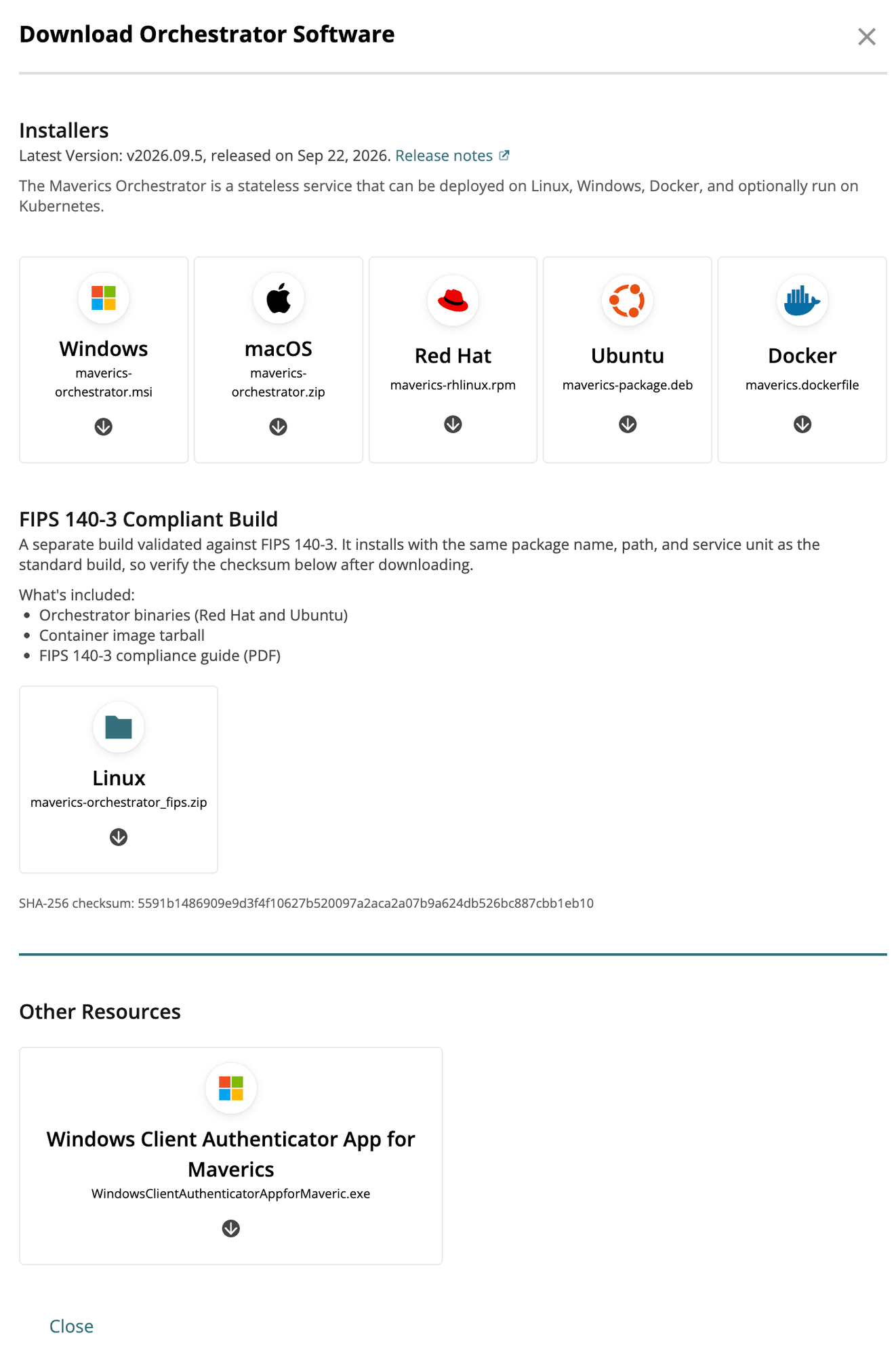 The FIPS archive (`maverics-orchestrator_fips.zip`) includes:
* Orchestrator binaries for Red Hat and Ubuntu
* Container image tarball
* FIPS 140-3 compliance guide (PDF)
It installs with the same package name, path, and service unit as the standard build. Verify the SHA-256 checksum shown in the modal after downloading.
## Related Pages
Compliance frameworks and audit logging
Orchestrator installation and build options
The FIPS archive (`maverics-orchestrator_fips.zip`) includes:
* Orchestrator binaries for Red Hat and Ubuntu
* Container image tarball
* FIPS 140-3 compliance guide (PDF)
It installs with the same package name, path, and service unit as the standard build. Verify the SHA-256 checksum shown in the modal after downloading.
## Related Pages
Compliance frameworks and audit logging
Orchestrator installation and build options