> ## Documentation Index
> Fetch the complete documentation index at: https://docs.strata.io/llms.txt
> Use this file to discover all available pages before exploring further.
# Continuity
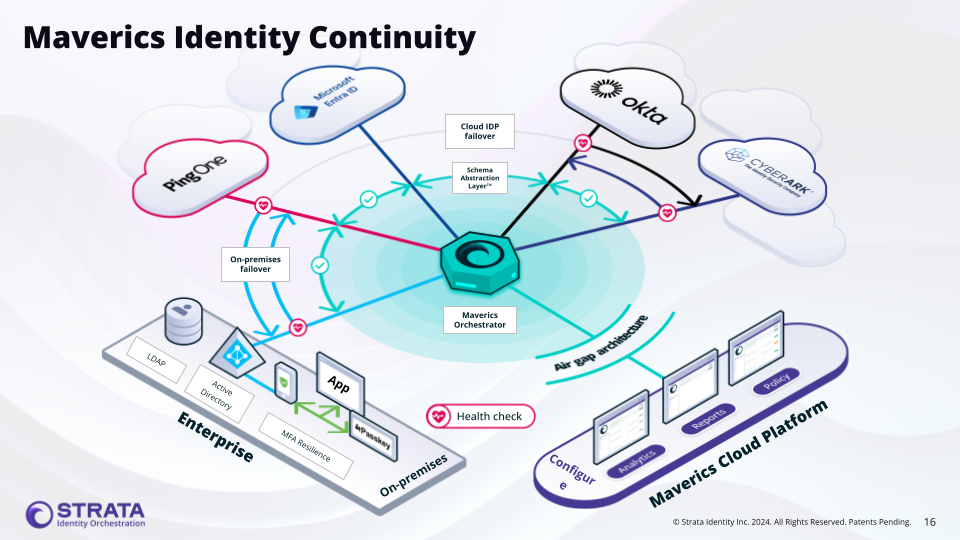
The Continuity connector enables IdP failover across multiple identity providers -- ensuring authentication continues working even when a primary identity provider is unavailable.
 **Console terminology:** In the Maverics Console, this section is called
**Identity Fabric**. The YAML configuration uses the `connectors` key to define
identity provider integrations.
## Overview
The Continuity connector is unique among identity connectors because it doesn't connect to a single identity provider. Instead, it orchestrates failover across multiple existing connectors. When the primary IdP is unavailable, the Orchestrator automatically routes authentication requests to the next connector in the ordered list. The connector also supports attribute normalization, mapping different attribute names across providers to a consistent set of names.
The Continuity connector uses the `failover` strategy with an ordered list of IdP connectors defined in `failover.idps`. The first connector in the list is the primary; subsequent connectors serve as fallbacks.
### Identity Backup vs Identity Continuity
It is important to distinguish between **Identity Backup** and **Identity Continuity**:
* **Identity Backup** preserves identity data (users, groups, policies) so it can be restored after an outage. It protects the data itself.
* **Identity Continuity** ensures that authentication and access remain uninterrupted during an IdP outage. It protects the user experience by routing requests to an alternate identity provider while the primary is down.
The Continuity connector implements Identity Continuity -- it does not back up or replicate identity data between providers. Instead, it uses health-check-driven failover to route authentication to whichever provider is currently available.
## Use Cases
* **Identity resilience with automatic failover** -- Ensure authentication never goes down by automatically routing users to a healthy backup IdP when the primary experiences an outage. Health-check-driven failover eliminates manual intervention and keeps business-critical applications accessible.
* **Cloud-to-on-premises failover** -- When a cloud IdP (such as Okta or Entra ID) is unavailable, automatically fail over to an on-premises IdP like ADFS or Active Directory so users maintain uninterrupted access to applications.
* **Cloud-to-cloud redundancy** -- Maintain high availability by configuring failover between two cloud identity providers (e.g., Okta primary with Entra ID backup), protecting against vendor-specific outages.
* **Zero-downtime IdP migration** -- Gradually shift authentication from a legacy IdP to a modern one without service interruption. Set the new IdP as primary and keep the old IdP as fallback during the transition, reducing risk and enabling IdP rationalization.
## Supported Identity Services
Not all identity services support the health monitoring required for Continuity failover. The following table lists which services are supported:
| Supported | Not Supported |
| ----------------------------- | ---------------------------- |
| ADFS SAML | 1Kosmos |
| Amazon Cognito | HYPR |
| Auth0 | Windows Client Authenticator |
| CyberArk | WSO2 |
| Duo | |
| Entra ID | |
| Generic OIDC | |
| Generic SAML | |
| Keycloak | |
| Okta | |
| Oracle Identity Cloud Service | |
| Ping Federate | |
| Trusona | |
Unsupported services lack a reliable health check endpoint. If your identity provider is not listed as supported, contact [Strata support](https://strataidentity.my.site.com/support/s/) to discuss options.
## Setup
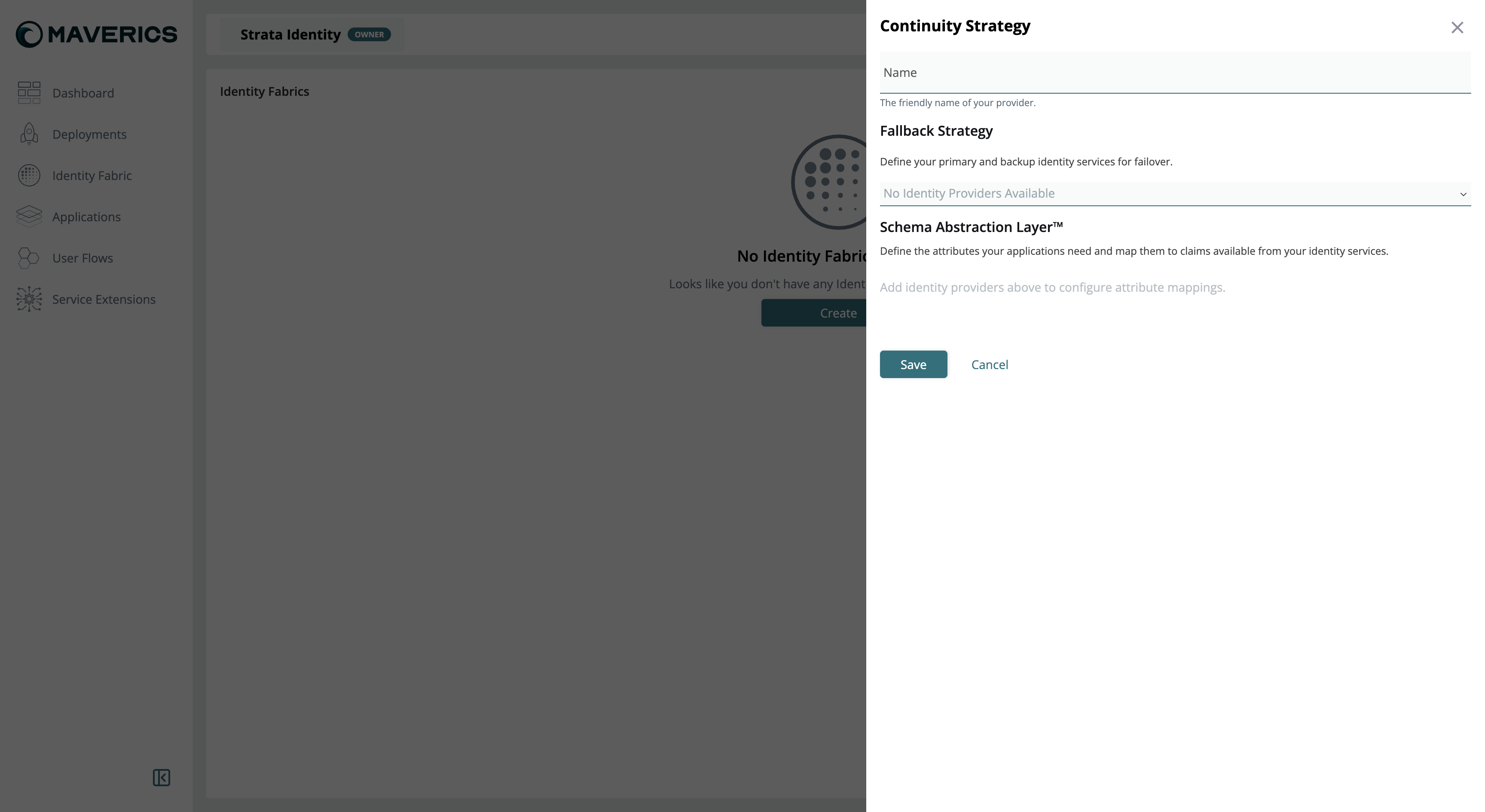
To create a Continuity Strategy in the Maverics Console:
1. Navigate to **Identity Fabric** in the Console sidebar.
2. Click **Create** and select **Continuity Strategy**.
3. Enter a **Name** for the strategy -- this is the friendly name that identifies your failover configuration.
4. In the **Fallback Strategy** section, add identity providers in priority order. The first provider is the primary; subsequent providers serve as backups that are used when providers above them are unavailable.
5. In the **Schema Abstraction Layer** section, define attribute mappings. For each attribute your applications need, map it to the corresponding claim name in each identity provider (see [Schema Abstraction Layer](#schema-abstraction-layer) below).
6. Click **Save**.
**Console terminology:** In the Maverics Console, this section is called
**Identity Fabric**. The YAML configuration uses the `connectors` key to define
identity provider integrations.
## Overview
The Continuity connector is unique among identity connectors because it doesn't connect to a single identity provider. Instead, it orchestrates failover across multiple existing connectors. When the primary IdP is unavailable, the Orchestrator automatically routes authentication requests to the next connector in the ordered list. The connector also supports attribute normalization, mapping different attribute names across providers to a consistent set of names.
The Continuity connector uses the `failover` strategy with an ordered list of IdP connectors defined in `failover.idps`. The first connector in the list is the primary; subsequent connectors serve as fallbacks.
### Identity Backup vs Identity Continuity
It is important to distinguish between **Identity Backup** and **Identity Continuity**:
* **Identity Backup** preserves identity data (users, groups, policies) so it can be restored after an outage. It protects the data itself.
* **Identity Continuity** ensures that authentication and access remain uninterrupted during an IdP outage. It protects the user experience by routing requests to an alternate identity provider while the primary is down.
The Continuity connector implements Identity Continuity -- it does not back up or replicate identity data between providers. Instead, it uses health-check-driven failover to route authentication to whichever provider is currently available.
## Use Cases
* **Identity resilience with automatic failover** -- Ensure authentication never goes down by automatically routing users to a healthy backup IdP when the primary experiences an outage. Health-check-driven failover eliminates manual intervention and keeps business-critical applications accessible.
* **Cloud-to-on-premises failover** -- When a cloud IdP (such as Okta or Entra ID) is unavailable, automatically fail over to an on-premises IdP like ADFS or Active Directory so users maintain uninterrupted access to applications.
* **Cloud-to-cloud redundancy** -- Maintain high availability by configuring failover between two cloud identity providers (e.g., Okta primary with Entra ID backup), protecting against vendor-specific outages.
* **Zero-downtime IdP migration** -- Gradually shift authentication from a legacy IdP to a modern one without service interruption. Set the new IdP as primary and keep the old IdP as fallback during the transition, reducing risk and enabling IdP rationalization.
## Supported Identity Services
Not all identity services support the health monitoring required for Continuity failover. The following table lists which services are supported:
| Supported | Not Supported |
| ----------------------------- | ---------------------------- |
| ADFS SAML | 1Kosmos |
| Amazon Cognito | HYPR |
| Auth0 | Windows Client Authenticator |
| CyberArk | WSO2 |
| Duo | |
| Entra ID | |
| Generic OIDC | |
| Generic SAML | |
| Keycloak | |
| Okta | |
| Oracle Identity Cloud Service | |
| Ping Federate | |
| Trusona | |
Unsupported services lack a reliable health check endpoint. If your identity provider is not listed as supported, contact [Strata support](https://strataidentity.my.site.com/support/s/) to discuss options.
## Setup
To create a Continuity Strategy in the Maverics Console:
1. Navigate to **Identity Fabric** in the Console sidebar.
2. Click **Create** and select **Continuity Strategy**.
3. Enter a **Name** for the strategy -- this is the friendly name that identifies your failover configuration.
4. In the **Fallback Strategy** section, add identity providers in priority order. The first provider is the primary; subsequent providers serve as backups that are used when providers above them are unavailable.
5. In the **Schema Abstraction Layer** section, define attribute mappings. For each attribute your applications need, map it to the corresponding claim name in each identity provider (see [Schema Abstraction Layer](#schema-abstraction-layer) below).
6. Click **Save**.
 Deploying a Continuity Strategy to production requires a license. Contact [sales@strata.io](mailto:sales@strata.io) for licensing.
```yaml maverics.yaml theme={null}
connectors:
- name: failover-idp
type: continuity
strategy: failover
failover:
idps:
- primary-idp
- backup-idp
attributes:
- name: email
mapping:
primary-idp: primary_email
backup-idp: backup_email
default: "unknown@example.com"
```
## Configuration Reference
| Key | Type | Required | Description |
| ---------------------- | --------- | -------- | ------------------------------------------------------------------------------------------------------------------------ |
| `name` | string | Yes | Unique connector identifier referenced by app policies |
| `type` | string | Yes | Must be `continuity` |
| `strategy` | string | Yes | Failover strategy -- currently only `failover` is supported |
| `failover.idps` | string\[] | Yes | Ordered list of connector names to try. The first entry is the primary; subsequent entries are fallbacks tried in order. |
| `attributes` | object\[] | No | Attribute normalization rules across identity providers |
| `attributes[].name` | string | Yes | Normalized attribute name used by the Orchestrator |
| `attributes[].mapping` | map | Yes | Map of connector name to that connector's attribute name (e.g., `primary-idp: "primary_email"`) |
| `attributes[].default` | string | No | Default value if the attribute is unavailable from any IdP |
For the complete connector field reference, see [Identity Fabric](/reference/orchestrator/identity-fabric#configuration-reference).
The connectors listed in `failover.idps` must be separately defined in the `connectors` section. The Continuity connector does not create them -- it orchestrates failover between existing connectors. Each referenced connector (e.g., an OIDC or SAML connector) must have its own complete configuration.
## How Failover Works
1. The Orchestrator performs configurable health checks on each connector listed in `failover.idps`. Health checks run at the interval specified on each individual connector's `healthCheck` configuration.
2. When an authentication request arrives, the Orchestrator routes it to the first **healthy** connector in the ordered list.
3. If the primary connector's health check is failing, the Orchestrator skips it and routes to the next healthy connector in the list. This is proactive, health-check-driven routing -- not trial-and-error login attempts.
4. The `attributes` section normalizes attribute names across providers, so downstream applications see consistent attribute names regardless of which IdP handled the authentication.
## Health Monitoring
Identity Service Health Monitoring must be enabled on **each individual IdP connector** used in the Continuity strategy -- not on the Continuity connector itself. The Continuity connector reads the health status of its referenced connectors to make routing decisions.
### Health Check Configuration
Add a `healthCheck` block to each connector referenced in `failover.idps`:
```yaml maverics.yaml theme={null}
connectors:
- name: primary-idp
type: oidc
oidcWellKnownURL: "https://primary.example.com/.well-known/openid-configuration"
oauthClientID: "{{ env.PRIMARY_CLIENT_ID }}"
oauthClientSecret:
oauthRedirectURL: "https://app.example.com/oidc/callback"
scopes: "openid profile email"
healthCheck:
enabled: true
interval: "10s"
timeout: "5s"
unhealthyThreshold: 3
healthyThreshold: 2
```
### Health Check Fields
| Key | Type | Default | Description |
| -------------------------------- | ------- | ------- | ------------------------------------------------------------------------------------------------------------------------ |
| `healthCheck.enabled` | boolean | `false` | Enable or disable health monitoring for this connector |
| `healthCheck.interval` | string | `"30s"` | Polling frequency (e.g., `"10s"`, `"1m"`, `"30s"`) |
| `healthCheck.timeout` | string | `"10s"` | Maximum wait time for a health check response before considering it failed |
| `healthCheck.unhealthyThreshold` | integer | `3` | Number of consecutive health check failures before marking the connector as unhealthy and triggering failover |
| `healthCheck.healthyThreshold` | integer | `2` | Number of consecutive health check successes before marking a previously-unhealthy connector as healthy again (fallback) |
### Custom Health Check Fields
For providers that require non-standard health check endpoints or validation, use the `customEndpoint` object:
| Key | Type | Description |
| ------------------------------------------------------------- | ---------- | ----------------------------------------------------------------------------- |
| `healthCheck.customEndpoint.type` | string | The type of the custom endpoint. Must be `http`. |
| `healthCheck.customEndpoint.endpoint` | string | Custom URL to check instead of the default well-known endpoint |
| `healthCheck.customEndpoint.headers` | map | Additional HTTP headers to include in the health check request |
| `healthCheck.customEndpoint.tls` | string | Name of the TLS config used to establish a secure connection |
| `healthCheck.customEndpoint.responseMatcher.expectedStatuses` | integer\[] | HTTP status codes considered healthy (e.g., `[200, 204]`) |
| `healthCheck.customEndpoint.responseMatcher.body.equals` | string | The response body must exactly equal this string to be considered healthy |
| `healthCheck.customEndpoint.responseMatcher.body.contains` | string | The response body must contain this string to be considered healthy |
| `healthCheck.customEndpoint.responseMatcher.body.regexp` | string | The response body must match this regular expression to be considered healthy |
Only one of `body.equals`, `body.contains`, or `body.regexp` can be defined at a time.
### How Health Checks Work by Protocol
* **OIDC-based services** (Okta, Entra ID, Auth0, Keycloak, Generic OIDC): Health checks call the well-known discovery endpoint (e.g., `/.well-known/openid-configuration`). If the endpoint is unreachable or returns an error, the connector is marked unhealthy.
* **SAML-based services** (ADFS SAML, Generic SAML, Ping Federate): Health checks call the IdP's metadata endpoint.
* **LDAP/AD services** (Active Directory, LDAP): Health checks attempt a connection to the server URL and perform a bind operation.
When troubleshooting health check failures, enable debug-level logging. Look for messages like:
```
level=debug msg="idp health check failed: well-known metadata unavailable"
```
This indicates the Orchestrator cannot reach the IdP's discovery endpoint.
## Schema Abstraction Layer
The Schema Abstraction Layer creates a mapping between the attributes your applications require and the claims available from each identity service. Different identity providers often use different attribute names for the same data -- for example, Okta might use `email` while Entra ID uses `preferred_username`, and an LDAP directory might use `mail`.
Deploying a Continuity Strategy to production requires a license. Contact [sales@strata.io](mailto:sales@strata.io) for licensing.
```yaml maverics.yaml theme={null}
connectors:
- name: failover-idp
type: continuity
strategy: failover
failover:
idps:
- primary-idp
- backup-idp
attributes:
- name: email
mapping:
primary-idp: primary_email
backup-idp: backup_email
default: "unknown@example.com"
```
## Configuration Reference
| Key | Type | Required | Description |
| ---------------------- | --------- | -------- | ------------------------------------------------------------------------------------------------------------------------ |
| `name` | string | Yes | Unique connector identifier referenced by app policies |
| `type` | string | Yes | Must be `continuity` |
| `strategy` | string | Yes | Failover strategy -- currently only `failover` is supported |
| `failover.idps` | string\[] | Yes | Ordered list of connector names to try. The first entry is the primary; subsequent entries are fallbacks tried in order. |
| `attributes` | object\[] | No | Attribute normalization rules across identity providers |
| `attributes[].name` | string | Yes | Normalized attribute name used by the Orchestrator |
| `attributes[].mapping` | map | Yes | Map of connector name to that connector's attribute name (e.g., `primary-idp: "primary_email"`) |
| `attributes[].default` | string | No | Default value if the attribute is unavailable from any IdP |
For the complete connector field reference, see [Identity Fabric](/reference/orchestrator/identity-fabric#configuration-reference).
The connectors listed in `failover.idps` must be separately defined in the `connectors` section. The Continuity connector does not create them -- it orchestrates failover between existing connectors. Each referenced connector (e.g., an OIDC or SAML connector) must have its own complete configuration.
## How Failover Works
1. The Orchestrator performs configurable health checks on each connector listed in `failover.idps`. Health checks run at the interval specified on each individual connector's `healthCheck` configuration.
2. When an authentication request arrives, the Orchestrator routes it to the first **healthy** connector in the ordered list.
3. If the primary connector's health check is failing, the Orchestrator skips it and routes to the next healthy connector in the list. This is proactive, health-check-driven routing -- not trial-and-error login attempts.
4. The `attributes` section normalizes attribute names across providers, so downstream applications see consistent attribute names regardless of which IdP handled the authentication.
## Health Monitoring
Identity Service Health Monitoring must be enabled on **each individual IdP connector** used in the Continuity strategy -- not on the Continuity connector itself. The Continuity connector reads the health status of its referenced connectors to make routing decisions.
### Health Check Configuration
Add a `healthCheck` block to each connector referenced in `failover.idps`:
```yaml maverics.yaml theme={null}
connectors:
- name: primary-idp
type: oidc
oidcWellKnownURL: "https://primary.example.com/.well-known/openid-configuration"
oauthClientID: "{{ env.PRIMARY_CLIENT_ID }}"
oauthClientSecret:
oauthRedirectURL: "https://app.example.com/oidc/callback"
scopes: "openid profile email"
healthCheck:
enabled: true
interval: "10s"
timeout: "5s"
unhealthyThreshold: 3
healthyThreshold: 2
```
### Health Check Fields
| Key | Type | Default | Description |
| -------------------------------- | ------- | ------- | ------------------------------------------------------------------------------------------------------------------------ |
| `healthCheck.enabled` | boolean | `false` | Enable or disable health monitoring for this connector |
| `healthCheck.interval` | string | `"30s"` | Polling frequency (e.g., `"10s"`, `"1m"`, `"30s"`) |
| `healthCheck.timeout` | string | `"10s"` | Maximum wait time for a health check response before considering it failed |
| `healthCheck.unhealthyThreshold` | integer | `3` | Number of consecutive health check failures before marking the connector as unhealthy and triggering failover |
| `healthCheck.healthyThreshold` | integer | `2` | Number of consecutive health check successes before marking a previously-unhealthy connector as healthy again (fallback) |
### Custom Health Check Fields
For providers that require non-standard health check endpoints or validation, use the `customEndpoint` object:
| Key | Type | Description |
| ------------------------------------------------------------- | ---------- | ----------------------------------------------------------------------------- |
| `healthCheck.customEndpoint.type` | string | The type of the custom endpoint. Must be `http`. |
| `healthCheck.customEndpoint.endpoint` | string | Custom URL to check instead of the default well-known endpoint |
| `healthCheck.customEndpoint.headers` | map | Additional HTTP headers to include in the health check request |
| `healthCheck.customEndpoint.tls` | string | Name of the TLS config used to establish a secure connection |
| `healthCheck.customEndpoint.responseMatcher.expectedStatuses` | integer\[] | HTTP status codes considered healthy (e.g., `[200, 204]`) |
| `healthCheck.customEndpoint.responseMatcher.body.equals` | string | The response body must exactly equal this string to be considered healthy |
| `healthCheck.customEndpoint.responseMatcher.body.contains` | string | The response body must contain this string to be considered healthy |
| `healthCheck.customEndpoint.responseMatcher.body.regexp` | string | The response body must match this regular expression to be considered healthy |
Only one of `body.equals`, `body.contains`, or `body.regexp` can be defined at a time.
### How Health Checks Work by Protocol
* **OIDC-based services** (Okta, Entra ID, Auth0, Keycloak, Generic OIDC): Health checks call the well-known discovery endpoint (e.g., `/.well-known/openid-configuration`). If the endpoint is unreachable or returns an error, the connector is marked unhealthy.
* **SAML-based services** (ADFS SAML, Generic SAML, Ping Federate): Health checks call the IdP's metadata endpoint.
* **LDAP/AD services** (Active Directory, LDAP): Health checks attempt a connection to the server URL and perform a bind operation.
When troubleshooting health check failures, enable debug-level logging. Look for messages like:
```
level=debug msg="idp health check failed: well-known metadata unavailable"
```
This indicates the Orchestrator cannot reach the IdP's discovery endpoint.
## Schema Abstraction Layer
The Schema Abstraction Layer creates a mapping between the attributes your applications require and the claims available from each identity service. Different identity providers often use different attribute names for the same data -- for example, Okta might use `email` while Entra ID uses `preferred_username`, and an LDAP directory might use `mail`.
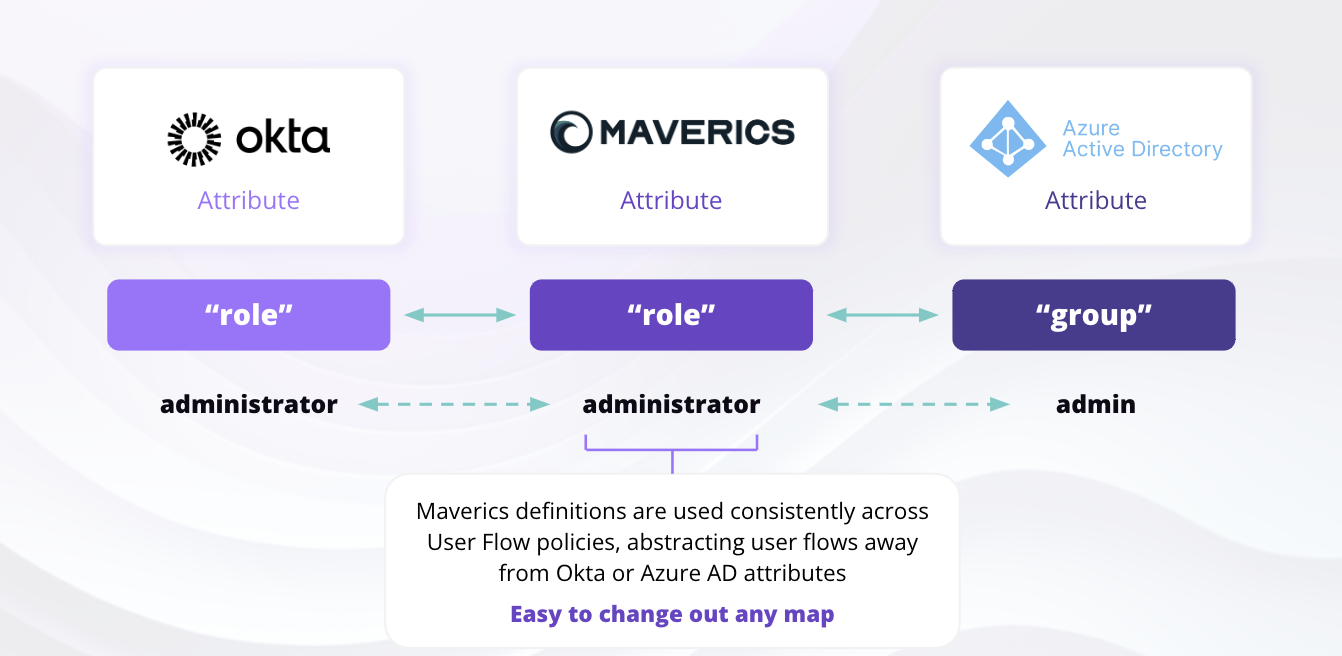 The Schema Abstraction Layer solves this by defining a normalized attribute name (the Maverics attribute) and mapping it to the corresponding claim in each provider. During failover, when the Orchestrator establishes a new session with the backup IdP, it uses this mapping to retrieve the equivalent claims -- ensuring downstream applications receive the same attribute names regardless of which IdP authenticated the user.
In YAML configuration, the Schema Abstraction Layer is expressed through the `attributes` section of the Continuity connector:
```yaml maverics.yaml theme={null}
connectors:
- name: failover-idp
type: continuity
strategy: failover
failover:
idps:
- okta-idp
- entra-idp
- ldap-idp
attributes:
- name: email
mapping:
okta-idp: email
entra-idp: preferred_username
ldap-idp: mail
- name: role
mapping:
okta-idp: role
entra-idp: group
default: "user"
- name: display_name
mapping:
okta-idp: name
entra-idp: displayName
ldap-idp: cn
```
Each entry in `attributes` defines:
* **`name`** -- The normalized attribute name that your applications will receive.
* **`mapping`** -- A map from connector name to the claim name used by that provider.
* **`default`** -- An optional fallback value if the attribute is unavailable from the authenticating IdP.
The Schema Abstraction Layer solves this by defining a normalized attribute name (the Maverics attribute) and mapping it to the corresponding claim in each provider. During failover, when the Orchestrator establishes a new session with the backup IdP, it uses this mapping to retrieve the equivalent claims -- ensuring downstream applications receive the same attribute names regardless of which IdP authenticated the user.
In YAML configuration, the Schema Abstraction Layer is expressed through the `attributes` section of the Continuity connector:
```yaml maverics.yaml theme={null}
connectors:
- name: failover-idp
type: continuity
strategy: failover
failover:
idps:
- okta-idp
- entra-idp
- ldap-idp
attributes:
- name: email
mapping:
okta-idp: email
entra-idp: preferred_username
ldap-idp: mail
- name: role
mapping:
okta-idp: role
entra-idp: group
default: "user"
- name: display_name
mapping:
okta-idp: name
entra-idp: displayName
ldap-idp: cn
```
Each entry in `attributes` defines:
* **`name`** -- The normalized attribute name that your applications will receive.
* **`mapping`** -- A map from connector name to the claim name used by that provider.
* **`default`** -- An optional fallback value if the attribute is unavailable from the authenticating IdP.
 ## Troubleshooting
Every connector name in `failover.idps` must have a corresponding entry in the `connectors` section. Missing connectors will cause configuration validation errors at startup.
**Fix:** Check that each name listed in `failover.idps` exactly matches a connector `name` defined elsewhere in the configuration.
If different IdPs use different attribute names for the same data (e.g., `email` vs `mail`), applications may receive inconsistent attribute names depending on which IdP authenticated the user.
**Fix:** Use the `attributes` section to map provider-specific claim names to a single normalized name. Ensure every connector in `failover.idps` has an entry in each attribute's `mapping`.
If health checks are not enabled on the individual connectors referenced by the Continuity connector, the Orchestrator cannot proactively detect unavailable IdPs. It will instead rely on authentication failure, which degrades the user experience.
**Fix:** Add `healthCheck.enabled: true` on each connector listed in `failover.idps`. Set appropriate `interval`, `timeout`, and `unhealthyThreshold` values.
This debug log message indicates the Orchestrator cannot reach the IdP's discovery endpoint.
**Possible causes:**
* Network connectivity issues between the Orchestrator and the IdP
* DNS resolution failures
* Firewall rules blocking the health check request
* The IdP's well-known endpoint has changed or is temporarily unavailable
* TLS certificate issues (use `healthCheck.customEndpoint.tls` to reference a TLS config for self-signed certificates)
**Fix:** Verify the IdP's well-known endpoint is reachable from the Orchestrator host. Check DNS, firewall, and TLS settings. Enable debug logging to see the full error.
The connector listed first in `failover.idps` is always tried first when healthy. If your preferred IdP is not receiving traffic, check the ordering.
**Fix:** Place the most reliable or preferred IdP first in the `failover.idps` list. Subsequent connectors are only used when all preceding connectors are unhealthy.
## Related Pages
Step-by-step guide to configuring Continuity with Console UI and YAML
Overview of all identity providers and supported types
Complete field reference for all connector types
Generic OIDC connector -- commonly used as a failover target
Generic SAML connector -- commonly used as a failover target
## Troubleshooting
Every connector name in `failover.idps` must have a corresponding entry in the `connectors` section. Missing connectors will cause configuration validation errors at startup.
**Fix:** Check that each name listed in `failover.idps` exactly matches a connector `name` defined elsewhere in the configuration.
If different IdPs use different attribute names for the same data (e.g., `email` vs `mail`), applications may receive inconsistent attribute names depending on which IdP authenticated the user.
**Fix:** Use the `attributes` section to map provider-specific claim names to a single normalized name. Ensure every connector in `failover.idps` has an entry in each attribute's `mapping`.
If health checks are not enabled on the individual connectors referenced by the Continuity connector, the Orchestrator cannot proactively detect unavailable IdPs. It will instead rely on authentication failure, which degrades the user experience.
**Fix:** Add `healthCheck.enabled: true` on each connector listed in `failover.idps`. Set appropriate `interval`, `timeout`, and `unhealthyThreshold` values.
This debug log message indicates the Orchestrator cannot reach the IdP's discovery endpoint.
**Possible causes:**
* Network connectivity issues between the Orchestrator and the IdP
* DNS resolution failures
* Firewall rules blocking the health check request
* The IdP's well-known endpoint has changed or is temporarily unavailable
* TLS certificate issues (use `healthCheck.customEndpoint.tls` to reference a TLS config for self-signed certificates)
**Fix:** Verify the IdP's well-known endpoint is reachable from the Orchestrator host. Check DNS, firewall, and TLS settings. Enable debug logging to see the full error.
The connector listed first in `failover.idps` is always tried first when healthy. If your preferred IdP is not receiving traffic, check the ordering.
**Fix:** Place the most reliable or preferred IdP first in the `failover.idps` list. Subsequent connectors are only used when all preceding connectors are unhealthy.
## Related Pages
Step-by-step guide to configuring Continuity with Console UI and YAML
Overview of all identity providers and supported types
Complete field reference for all connector types
Generic OIDC connector -- commonly used as a failover target
Generic SAML connector -- commonly used as a failover target