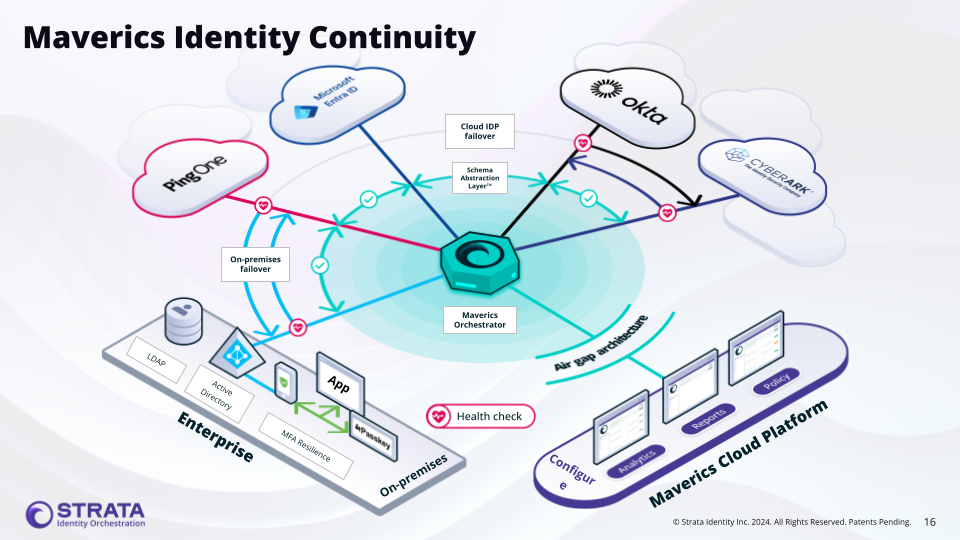
The Continuity connector enables IdP failover across multiple identity providers — ensuring authentication continues working even when a primary identity provider is unavailable.
Maverics Identity Continuity
Console terminology: In the Maverics Console, this section is called
Identity Fabric. The YAML configuration uses the connectors key to define
identity provider integrations.
The Continuity connector is unique among identity connectors because it doesn’t connect to a single identity provider. Instead, it orchestrates failover across multiple existing connectors. When the primary IdP is unavailable, the Orchestrator automatically routes authentication requests to the next connector in the ordered list. The connector also supports attribute normalization, mapping different attribute names across providers to a consistent set of names.The Continuity connector uses the failover strategy with an ordered list of IdP connectors defined in failover.idps. The first connector in the list is the primary; subsequent connectors serve as fallbacks.
It is important to distinguish between Identity Backup and Identity Continuity:
Identity Backup preserves identity data (users, groups, policies) so it can be restored after an outage. It protects the data itself.
Identity Continuity ensures that authentication and access remain uninterrupted during an IdP outage. It protects the user experience by routing requests to an alternate identity provider while the primary is down.
The Continuity connector implements Identity Continuity — it does not back up or replicate identity data between providers. Instead, it uses health-check-driven failover to route authentication to whichever provider is currently available.
Identity resilience with automatic failover — Ensure authentication never goes down by automatically routing users to a healthy backup IdP when the primary experiences an outage. Health-check-driven failover eliminates manual intervention and keeps business-critical applications accessible.
Cloud-to-on-premises failover — When a cloud IdP (such as Okta or Entra ID) is unavailable, automatically fail over to an on-premises IdP like ADFS or Active Directory so users maintain uninterrupted access to applications.
Cloud-to-cloud redundancy — Maintain high availability by configuring failover between two cloud identity providers (e.g., Okta primary with Entra ID backup), protecting against vendor-specific outages.
Zero-downtime IdP migration — Gradually shift authentication from a legacy IdP to a modern one without service interruption. Set the new IdP as primary and keep the old IdP as fallback during the transition, reducing risk and enabling IdP rationalization.
Not all identity services support the health monitoring required for Continuity failover. The following table lists which services are supported:
Supported
Not Supported
ADFS SAML
1Kosmos
Amazon Cognito
HYPR
Auth0
Windows Client Authenticator
CyberArk
WSO2
Duo
Entra ID
Generic OIDC
Generic SAML
Keycloak
Okta
Oracle Identity Cloud Service
Ping Federate
Trusona
Unsupported services lack a reliable health check endpoint. If your identity provider is not listed as supported, contact Strata support to discuss options.
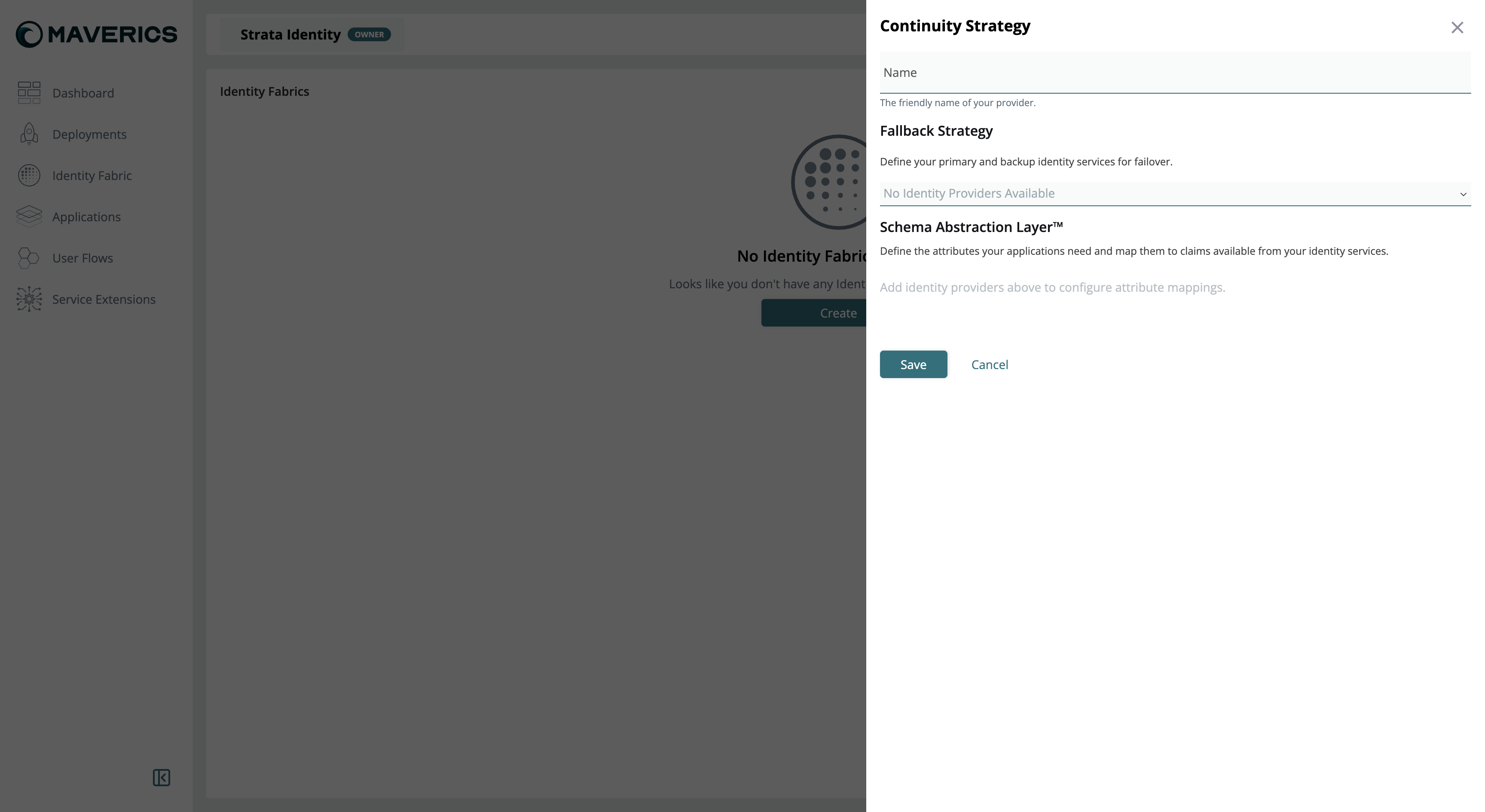
To create a Continuity Strategy in the Maverics Console:
Navigate to Identity Fabric in the Console sidebar.
Click Create and select Continuity Strategy.
Enter a Name for the strategy — this is the friendly name that identifies your failover configuration.
In the Fallback Strategy section, add identity providers in priority order. The first provider is the primary; subsequent providers serve as backups that are used when providers above them are unavailable.
In the Schema Abstraction Layer section, define attribute mappings. For each attribute your applications need, map it to the corresponding claim name in each identity provider (see Schema Abstraction Layer below).
Click Save.
Continuity Strategy creation in Maverics Console
Deploying a Continuity Strategy to production requires a license. Contact sales@strata.io for licensing.
Unique connector identifier referenced by app policies
type
string
Yes
Must be continuity
strategy
string
Yes
Failover strategy — currently only failover is supported
failover.idps
string[]
Yes
Ordered list of connector names to try. The first entry is the primary; subsequent entries are fallbacks tried in order.
attributes
object[]
No
Attribute normalization rules across identity providers
attributes[].name
string
Yes
Normalized attribute name used by the Orchestrator
attributes[].mapping
map
Yes
Map of connector name to that connector’s attribute name (e.g., primary-idp: "primary_email")
attributes[].default
string
No
Default value if the attribute is unavailable from any IdP
For the complete connector field reference, see Identity Fabric.
The connectors listed in failover.idps must be separately defined in the connectors section. The Continuity connector does not create them — it orchestrates failover between existing connectors. Each referenced connector (e.g., an OIDC or SAML connector) must have its own complete configuration.
The Orchestrator performs configurable health checks on each connector listed in failover.idps. Health checks run at the interval specified on each individual connector’s healthCheck configuration.
When an authentication request arrives, the Orchestrator routes it to the first healthy connector in the ordered list.
If the primary connector’s health check is failing, the Orchestrator skips it and routes to the next healthy connector in the list. This is proactive, health-check-driven routing — not trial-and-error login attempts.
The attributes section normalizes attribute names across providers, so downstream applications see consistent attribute names regardless of which IdP handled the authentication.
Identity Service Health Monitoring must be enabled on each individual IdP connector used in the Continuity strategy — not on the Continuity connector itself. The Continuity connector reads the health status of its referenced connectors to make routing decisions.
OIDC-based services (Okta, Entra ID, Auth0, Keycloak, Generic OIDC): Health checks call the well-known discovery endpoint (e.g., /.well-known/openid-configuration). If the endpoint is unreachable or returns an error, the connector is marked unhealthy.
SAML-based services (ADFS SAML, Generic SAML, Ping Federate): Health checks call the IdP’s metadata endpoint.
LDAP/AD services (Active Directory, LDAP): Health checks attempt a connection to the server URL and perform a bind operation.
When troubleshooting health check failures, enable debug-level logging. Look for messages like:
level=debug msg="idp health check failed: well-known metadata unavailable"
This indicates the Orchestrator cannot reach the IdP’s discovery endpoint.
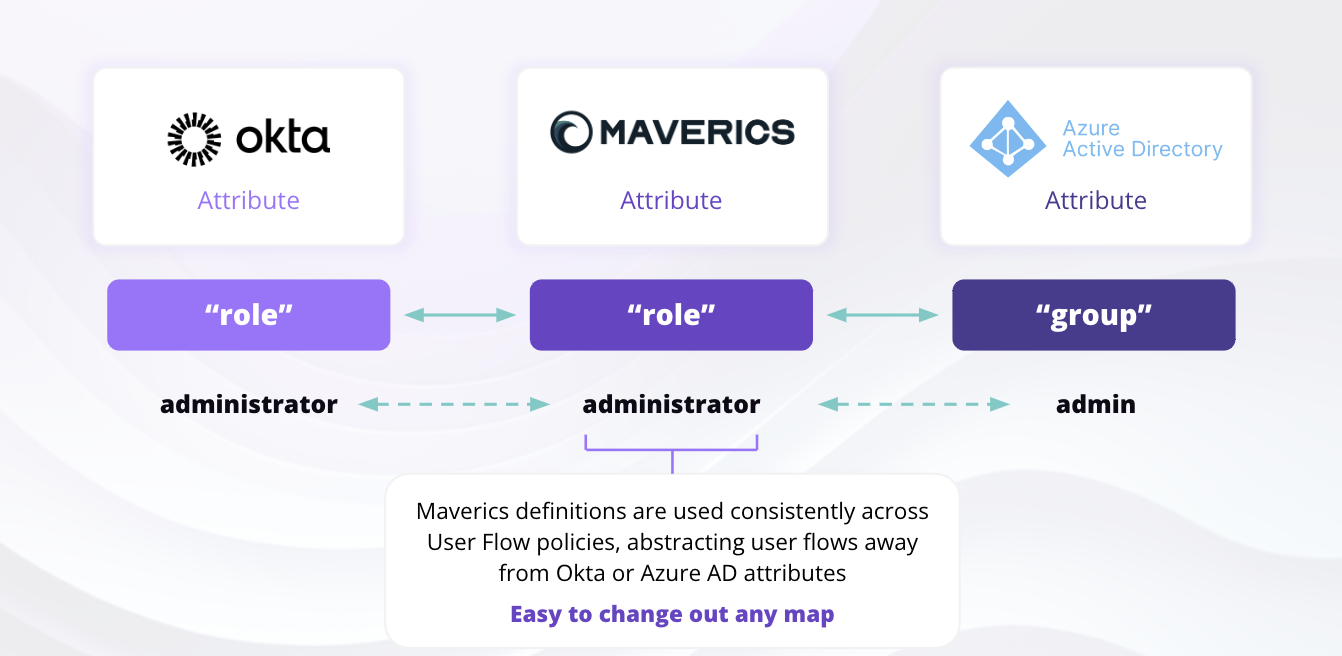
The Schema Abstraction Layer creates a mapping between the attributes your applications require and the claims available from each identity service. Different identity providers often use different attribute names for the same data — for example, Okta might use email while Entra ID uses preferred_username, and an LDAP directory might use mail.
Schema Abstraction Layer
The Schema Abstraction Layer solves this by defining a normalized attribute name (the Maverics attribute) and mapping it to the corresponding claim in each provider. During failover, when the Orchestrator establishes a new session with the backup IdP, it uses this mapping to retrieve the equivalent claims — ensuring downstream applications receive the same attribute names regardless of which IdP authenticated the user.In YAML configuration, the Schema Abstraction Layer is expressed through the attributes section of the Continuity connector:
maverics.yaml
connectors:
  - name: failover-idp
    type: continuity
    strategy: failover
    failover:
      idps:
        - okta-idp
        - entra-idp
        - ldap-idp
    attributes:
      - name: email
        mapping:
          okta-idp: email
          entra-idp: preferred_username
          ldap-idp: mail
      - name: role
        mapping:
          okta-idp: role
          entra-idp: group
        default: "user"
      - name: display_name
        mapping:
          okta-idp: name
          entra-idp: displayName
          ldap-idp: cn
Each entry in attributes defines:
name — The normalized attribute name that your applications will receive.
mapping — A map from connector name to the claim name used by that provider.
default — An optional fallback value if the attribute is unavailable from the authenticating IdP.
Schema Abstraction Layer configuration in Maverics Console
Every connector name in failover.idps must have a corresponding entry in the connectors section. Missing connectors will cause configuration validation errors at startup.Fix: Check that each name listed in failover.idps exactly matches a connector name defined elsewhere in the configuration.
Attribute normalization mapping issues
If different IdPs use different attribute names for the same data (e.g., email vs mail), applications may receive inconsistent attribute names depending on which IdP authenticated the user.Fix: Use the attributes section to map provider-specific claim names to a single normalized name. Ensure every connector in failover.idps has an entry in each attribute’s mapping.
Connector health checks not working
If health checks are not enabled on the individual connectors referenced by the Continuity connector, the Orchestrator cannot proactively detect unavailable IdPs. It will instead rely on authentication failure, which degrades the user experience.Fix: Add healthCheck.enabled: true on each connector listed in failover.idps. Set appropriate interval, timeout, and unhealthyThreshold values.
Health check fails with 'well-known metadata unavailable'
This debug log message indicates the Orchestrator cannot reach the IdP’s discovery endpoint.Possible causes:
Network connectivity issues between the Orchestrator and the IdP
DNS resolution failures
Firewall rules blocking the health check request
The IdP’s well-known endpoint has changed or is temporarily unavailable
TLS certificate issues (use healthCheck.customEndpoint.tls to reference a TLS config for self-signed certificates)
Fix: Verify the IdP’s well-known endpoint is reachable from the Orchestrator host. Check DNS, firewall, and TLS settings. Enable debug logging to see the full error.
Failover order is wrong
The connector listed first in failover.idps is always tried first when healthy. If your preferred IdP is not receiving traffic, check the ordering.Fix: Place the most reliable or preferred IdP first in the failover.idps list. Subsequent connectors are only used when all preceding connectors are unhealthy.